AI Old Photo Restoration: Restore Old Photos with AI in Seconds
Free online AI photo restorer to fix blurry, faded, and damaged family photos. No Photoshop skills needed — just upload and let our AI restoration model bring your memories back to life.
Free AI Old Photo Restoration Tool
Upload an Old Photo to Restore with AI
Drag & drop or click to browse — a scanned print, phone snapshot, or black-and-white original
Supports JPG, PNG, WebP (Max 5MB)
Why Choose Our AI Old Photo Restoration
Purpose-built for the quirks of aged photos — fading, scanning artifacts, paper textures, and pre-digital imperfections.
AI-Powered Restoration
Deep learning models reverse common failure modes of old photos — blur, noise, color cast, and fading — without inventing details that weren't there.
Results in Seconds
What used to take an hour in Photoshop now finishes in about 15 to 30 seconds, in your browser.
Preserves Original Tones
Black-and-white photos stay black and white. We enhance clarity without accidentally colorizing or re-styling your image.
Your Photos Stay Private
Uploaded photos are processed securely and never used to train any AI model. Files are removed after delivery.
Free to Try
Guests can try a limited watermarked restoration. Signed-in results cost 2 credits and are watermark-free; Free balances restore to 10 daily.
Handles Everyday Damage
Reduces surface scratches, dust, and light creasing on most scanned prints. Severely torn photos may need extra cleanup.
How to Restore an Old Photo in 3 Steps
From a faded, blurry scan to a clear, sharable image — in under a minute.
Upload your old photo
Drag & drop or browse. We support JPG, PNG, and WebP — whether it's a phone photo of a printed picture or a flatbed scan.
Let AI restore it automatically
Our restoration model removes blur, recovers fine details, enhances faces, and reduces noise — all in one pass.
Download the restored version
Get a high-resolution result ready to print, share on social media, or preserve in your family archive.
AI Old Photo Restoration Before & After
Real AI restoration examples — faded family portraits, blurry vintage scans, and more.
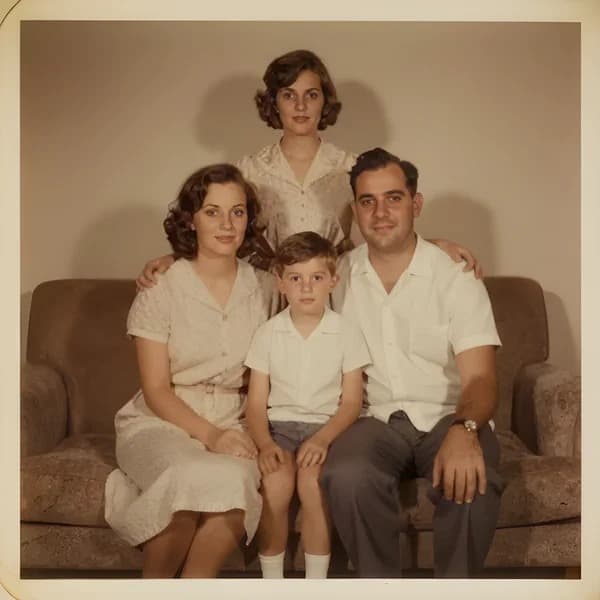
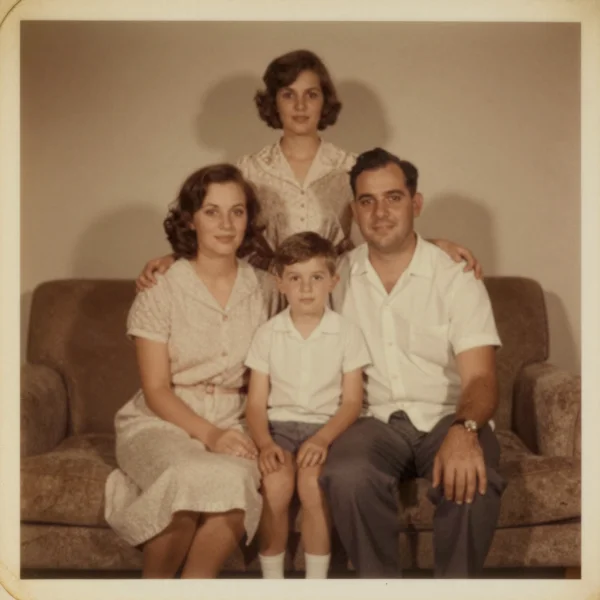
Restoring a Faded Family Portrait
Recovering contrast and detail in a sun-bleached color print
What Kind of Old Photos Can You Restore with AI?
From faded family portraits to scanned 1970s prints — our AI old photo restoration handles the most common restoration cases.
Revive old family albums
Bring clarity back to wedding portraits, childhood snapshots, and grandparents' photos stored in dusty albums for decades.
Bring faded photos back to life
Restore contrast and recover detail in sun-bleached or chemically faded prints from the 60s, 70s, and 80s.
Fix blurry vintage photos
Sharpen out-of-focus shots and motion-blurred moments that were impossible to reshoot.
Improve scanned photo quality
Clean up the haze and softness introduced by flatbed scanners or phone-camera copies of printed photos.
Repair minor damage and wear
Reduce surface scratches, dust specks, and light creasing. For severely torn photos, results may vary.
Enhance black & white originals
Restore clarity and texture in black-and-white photos from any era — without altering the original tones.
Understanding Old Photo Restoration: A Quick Guide
A short primer on why old photos degrade, how AI restoration actually works, and how to get the most out of your scan.
Why Old Photos Fade, Blur, and Degrade
Every printed photograph degrades over time. Silver-based black-and-white prints lose contrast as their surface silver oxidizes. Color prints from the 1960s–80s use unstable dyes that drift toward magenta or yellow under heat, humidity, and sunlight. Even sealed family albums accumulate micro-scratches, surface dust, and paper creasing. Add scanning haze and camera-softness from phone snapshots of prints, and most old photos carry several overlapping issues at once — which is exactly what AI old photo restoration is designed to untangle.
How AI Photo Restoration Actually Works
A modern AI restoration model is trained on millions of paired images — the same photo in degraded and clean form. Rather than sharpening everything globally (the way a generic photo enhancer might), the model learns to recognize the signature of each type of damage — fading, blur, sensor noise, scan haze, scratches — and reverse it selectively. The result looks believably original: sharp enough to print, with restored contrast and recovered fine detail, but without the plastic, over-processed look of a one-size-fits-all filter.
Tips for Scanning and Uploading Old Photos
Scan at 600 DPI on a flatbed scanner if you can; phone photos of prints work too, as long as you shoot straight-on in diffused daylight and avoid flash. Upload the original JPG or PNG — skip any 'save for web' compression, since our AI benefits from every original pixel. If a photo has a deep tear or a large missing region, run our AI Magic Eraser on that area first, then feed the result into Old Photo Restoration. For print-ready enlargements, chain the restored image into our AI Image Upscaler for a 4× resolution boost.
AI Old Photo Restoration FAQ
Everything you need to know about restoring old photos with AI.
More AI Photo Tools to Restore and Enhance Your Images
Other AI tools that pair well with AI old photo restoration.
AI Image Upscaler
Take your restored photo up to 4x resolution — perfect for printing at large sizes.
AI Photo Enhancer
Generic-purpose enhancer for any image, not just old photos.
AI Magic Eraser
Remove major tears, creases, or unwanted marks before running restoration.
AI Cartoon Generator
Turn your restored family photo into a cartoon-style keepsake.
AI Age Filter
After restoring, see what your relatives looked like at any age from 0 to 100 — or how they'd look today.