AI Headshot Generator Professional Photos in Seconds
Turn any selfie into a polished, LinkedIn-ready professional headshot. Six studio-quality styles, identity preserved, ready to download in under a minute.
AI Headshot Generator
Click or drop image
JPG, PNG, WebP · up to 16MB
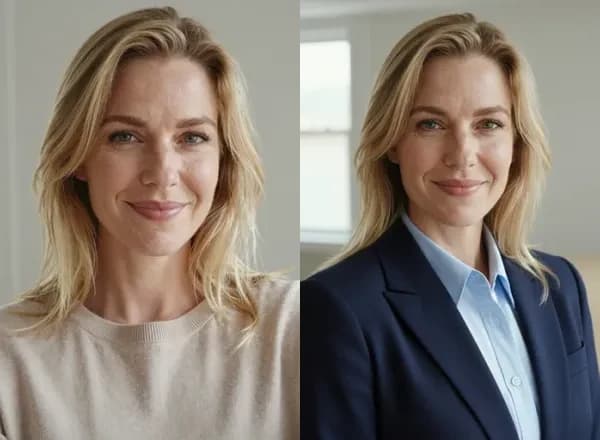
How to Create an AI Headshot for LinkedIn in 4 Steps
Turn a selfie into a LinkedIn-ready professional headshot in minutes — no studio, no appointment, no photographer fee.
Upload Your Photo
Drop a clear, front-facing selfie. JPG, PNG, or WebP up to 16MB. Good lighting helps.
Pick Gender & Style
Select Female, Male, or Custom mode, then tap one of six studio styles — or describe your own.
Generate
One click and our AI delivers a polished, identity-preserving headshot in around 30 seconds.
Download & Share
Save in high resolution and use it on LinkedIn, your resume, company site, or social profile.
AI Headshot Styles: Corporate, LinkedIn, Resume & ID Photo Examples
Six professional headshot styles, each tuned for flattering lighting, natural skin tones, and a convincing studio look. Hover any example to see the AI transformation.


Professional
Classic corporate look — tailored blazer, neutral office background, confident expression.


Business Casual
Approachable modern workplace — smart knit or shirt, bright daylight, warm smile.
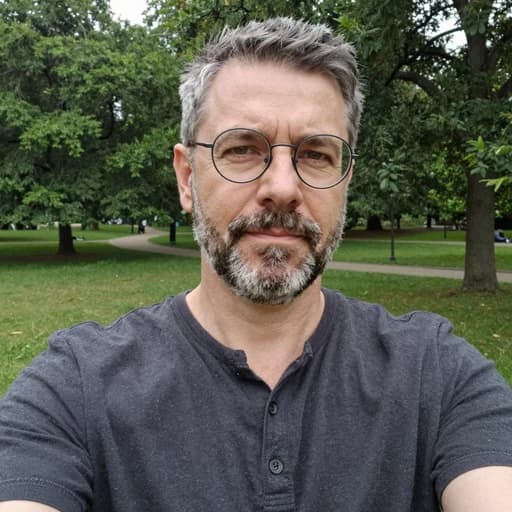

Academic
University faculty vibe — blazer or cardigan, library background, thoughtful pose.
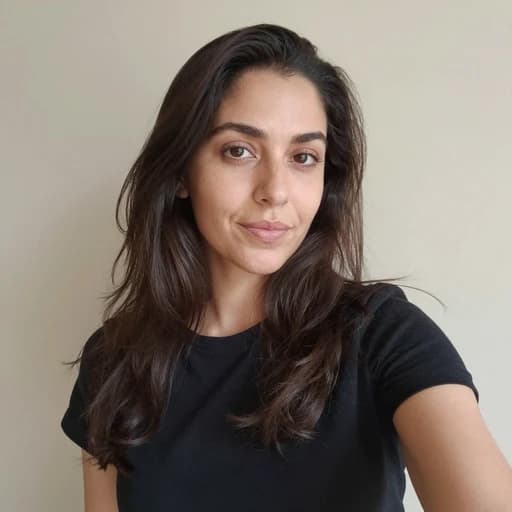

ID Photo
Passport-grade — plain pale-blue background, even lighting, neutral expression.
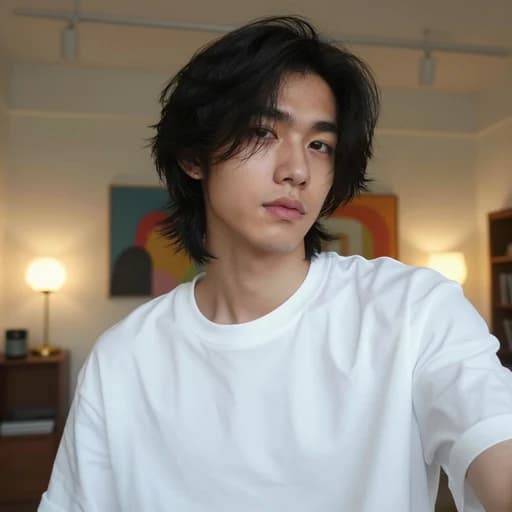
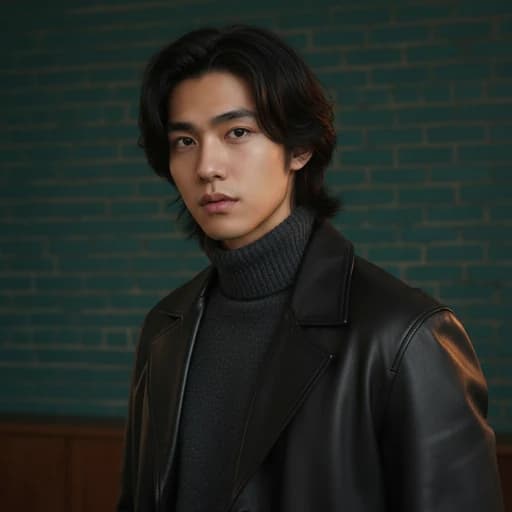
Creative
Editorial magazine look — fashion-forward attire, cinematic lighting, confident gaze.

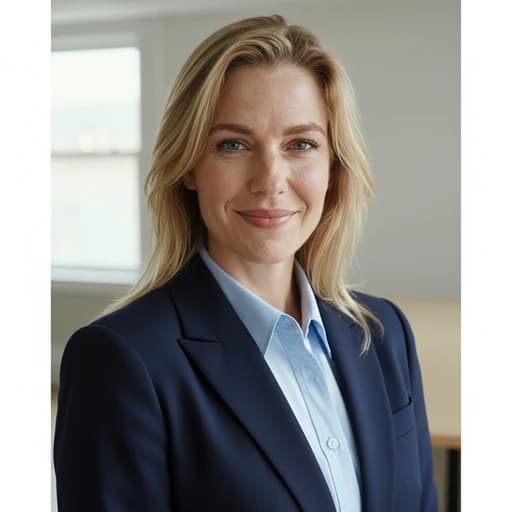
Optimized for circular profile crop — warm smile, bright background, direct eye contact.
AI Headshot Use Cases: LinkedIn, Resume, Real Estate & More
One AI headshot generator, dozens of professional contexts. See who benefits most from AI-generated headshots.
LinkedIn Profile Headshot
A professional LinkedIn headshot measurably increases profile views, connection requests, and recruiter interest. Generate a LinkedIn-ready profile picture in 30 seconds.
Resume & CV Photo
Need a resume photo for a job application? Markets across Europe, Asia, and Latin America expect a polished headshot on your CV. Generate a professional resume photo instantly.
Corporate Team Page
Give every remote team member a consistent, professional business headshot — no studio visit, no scheduling headaches. Perfect for company About pages and corporate directories.
Real Estate Agent Headshot
Realtor bio pages, yard signs, and business cards all need a trustworthy professional headshot. Generate one that reads confident and approachable.
CEO & Executive Business Portrait
Founders, CEOs, and executives need a polished corporate headshot for press releases, investor decks, and board bio pages.
Lawyer & Attorney Headshot
Law firm websites demand a dignified attorney headshot. Our AI nails the dark suit, neutral background, and confident expression.
Doctor & Medical Headshot
Hospital directories, clinic websites, and telehealth profiles need a warm, trustworthy medical professional headshot.
Actor Headshot
Experiment with multiple casting looks instantly. Perfect for early auditions, submissions, and agency profiles before a pro shoot.
Dating Profile Photo
Your main photo on dating apps sets the tone. A flattering AI headshot boosts matches and first impressions vs a casual selfie.
Author & Speaker Bio
Book covers, podcast guest slots, conference programs — every bio page deserves a real professional author portrait.
Social Media Avatar
X, Instagram, GitHub, Discord — upgrade every avatar slot with a consistent, professional AI-generated headshot.
Passport & Visa ID Photo
Need a compliant passport or visa photo? The ID Photo style delivers a plain blue background, even lighting, neutral expression.
AI Headshot Generator vs Studio Photographer: Cost, Time & Quality
How CubistAI AI Headshot Generator compares to a phone selfie and a traditional pro studio shoot on the factors that matter.
| Phone Selfie | Pro Studio | CubistAI AI | |
|---|---|---|---|
| Cost per headshot | Free | $100 – $500 | ~$0.30 (8 credits) |
| Time to result | 5 min | 1–2 weeks | ~30 seconds |
| Style variety | Limited | 6+ styles | |
| Unlimited retakes | |||
| Private & secure | — | ||
| Commercial rights | Varies |
Best Photo Tips for AI Headshot Generator Results
The quality of your source selfie directly affects the AI headshot output. Follow these six rules and you'll get a LinkedIn-ready professional headshot on the first try — no re-generations needed.
Use soft, even lighting
Stand near a large window during daytime, or face a soft light source. Avoid harsh overhead ceiling lights that create shadows under the eyes and nose.
Shoot at eye level
Hold the camera at eye height, not pointing up from the chest or down from above. Eye-level framing is the single biggest fix that makes AI headshots look believable.
Clean background helps
A plain wall, a sofa, or a blurred indoor scene works best. Busy backgrounds with logos, posters, or other people can confuse the AI and hurt identity preservation.
Neutral clothing is fine
Wear whatever you have on. The AI Headshot Generator will dress you in the style you pick — suit, blazer, knit, or button-up — regardless of your real shirt.
Neutral or subtle smile
A closed-mouth smile or soft neutral expression works in all 6 styles. Laughing with teeth showing can sometimes produce odd dental artifacts.
No sunglasses or filters
Make sure both eyes are clearly visible, no sunglasses, no hats covering the forehead, and no heavy Instagram-style filters that distort your face shape.
Do upload photos like these
- Front-facing photo, face centered and clearly visible
- Natural daylight from a window
- Shoulders visible, not just the head
- Recent photo, matches your current look
Avoid uploading these
- Group photos or crops with other people in frame
- Extreme selfie angles looking up at you from below
- Blurry, low-resolution, or heavily compressed images
- Beauty filters that over-smooth skin or reshape face
Who Should Use an AI Professional Headshot Generator?
An AI headshot generator is the fastest and most affordable way to get a professional profile picture for LinkedIn, resumes, and corporate use — but it is not for every single situation. Here is an honest breakdown of who benefits most.
Remote workers and distributed teams are the clearest winners. If your company has employees spread across multiple cities, flying everyone to a studio is not practical. AI business headshots give every team member a consistent corporate look on the About page without scheduling or travel cost.
Job seekers and career changers also benefit heavily. A professional photographer in a major city charges $150 to $500 for a single headshot session. With our AI headshot generator, you get a polished resume photo or LinkedIn profile picture for a tiny fraction of that — and you can experiment with six styles to find the one recruiters respond to best.
Real estate agents, lawyers, doctors, and consultants need a trustworthy headshot on their bio page, business card, and yard signs. These professions value a polished, conservative style that the Professional, Business Casual, and LinkedIn presets nail out of the box.
Authors, speakers, and content creators frequently need portraits for podcast guest spots, book jackets, and conference programs. Generating a fresh headshot in 30 seconds beats waiting two weeks for studio photo delivery.
Who should still hire a real photographer? If you are shooting a national magazine cover, a Fortune 500 board portrait, or brand imagery that will run as a billboard, a pro photographer with a real lighting setup still wins on absolute image quality and art direction. For 95% of everyday professional needs, AI headshots are more than good enough.
Are AI-Generated Professional Headshots Accepted on LinkedIn and Corporate Profiles?
Short answer: yes. LinkedIn, Upwork, company About pages, and the vast majority of professional platforms do not ban AI-generated profile photos. What they do care about is that the photo represents you accurately — which is exactly what the CubistAI AI Headshot Generator is built to do.
Our prompts explicitly lock the AI to preserve your facial identity, bone structure, eye shape, skin tone, hairstyle, age, and gender. The output swaps only your clothing, background, and lighting. Viewers who meet you in person should still recognize you instantly — that is the difference between an AI headshot generator and a full AI avatar creator.
Passport photos, government visa applications, and certain driver license renewals require an unedited photo taken within a specific timeframe, usually with no digital post-processing. For those, use our ID Photo style for a quick preview, but submit an authentic unedited photo to the official agency.
For every other professional context — LinkedIn profile picture, resume photo, corporate team page, business headshot, speaker bio, author portrait, realtor headshot, doctor directory photo — AI-generated professional headshots are widely accepted and indistinguishable from a studio shot for most viewers.
AI Headshot Generator FAQ
Everything you need to know about the CubistAI AI Headshot Generator — pricing, privacy, LinkedIn compatibility, and more.
What is an AI headshot generator?
It is a tool that uses generative AI to turn a regular selfie or portrait into a studio-quality professional headshot. CubistAI preserves your real face while applying business attire, flattering lighting, and a polished background.
How does the CubistAI AI Headshot work?
Upload a clear front-facing photo, pick a gender tab and one of six styles (Professional, Business Casual, Academic, ID Photo, Creative, LinkedIn), then click Generate. Your headshot is ready in about 30 seconds.
Is it safe to upload my photo?
Yes. Uploads happen over HTTPS and are used only to generate your headshot. We do not share your images with third parties and they are removed from processing storage once the job completes.
Can I use the result on LinkedIn?
Yes. The LinkedIn style is specifically tuned for chest-up framing, warm expression, and a clean neutral background that crops cleanly into LinkedIn's circular profile area.
How is this different from hiring a photographer?
A real photographer still wins on perfect lighting and live coaching. But AI headshots cost a small fraction, deliver in seconds, let you try many styles freely, and you can regenerate whenever your look or role changes.
What photo should I upload for best results?
Use a well-lit, front-facing photo where your face is clearly visible and unobstructed. Avoid sunglasses, hats that cover the forehead, heavy shadows, or extreme angles. A plain selfie taken near a window works great.
Can I generate multiple variations?
Yes. Each generation uses 8 credits, so you can try several styles or regenerate the same style for variety — results differ slightly each time due to AI randomness.
How many credits does one headshot cost?
Each AI headshot costs 8 credits. New accounts receive 30 signup credits, and Free balances are restored to 10 each day; Starter, Plus, and Pro include larger monthly credit bundles.
Can I use AI headshots commercially?
Yes. You own the headshots you generate and can use them on LinkedIn, company websites, resumes, book covers, marketing materials, or any commercial context.
Will the AI keep my real face?
Yes. Our prompts explicitly instruct the AI to preserve your facial identity, skin tone, hairstyle, and key features. The result will look recognizably like you — just in a polished professional look.
What size should a LinkedIn headshot be?
LinkedIn recommends a profile photo of 400 × 400 pixels (minimum 200 × 200). Our AI headshot generator outputs high-resolution images that exceed this requirement, so you can upload the result directly to LinkedIn without cropping or resizing.
Can I use an AI headshot as my resume photo?
Yes. In regions where a resume photo is expected — most of Europe, Asia, and Latin America — an AI-generated professional headshot works perfectly. Choose the Professional or Business Casual style for a polished, job-application-ready result.
What is the difference between a headshot and a portrait?
A headshot is a tightly framed photo from the chest up, optimized for professional use — LinkedIn profiles, resumes, corporate directories. A portrait is broader and more artistic. Our AI headshot generator focuses on the business headshot format: clean background, flattering lighting, and professional attire.
How often should I update my professional headshot?
Industry best practice is to refresh your business headshot every 1–2 years, or whenever your appearance changes noticeably (new hairstyle, glasses, significant weight change). With an AI headshot generator, updating is instant and costs only 8 credits — no need to rebook a photographer.
Can I generate business headshots for my entire team?
Yes. Each team member uploads their own selfie and generates a corporate headshot in the same style. This gives your company team page a consistent, professional look without coordinating a group studio session. Paid plans include enough credits for teams of any size.
Complete Your Professional Photo Toolkit
Tools that pair well with the AI Headshot Generator for finishing, resizing, or remixing your professional photos.
AI Photo Enhancer
Sharpen, upscale, and polish any photo before or after turning it into a professional headshot.
AI Background Remover
Remove the background from your headshot in one click for transparent PNG exports and custom backdrops.
AI Image Upscaler
Upscale your AI headshot to 4K for print-ready quality on business cards, flyers, and large displays.
AI Magic Eraser
Clean up distractions in the background of your source selfie before running it through the headshot generator.
AI Cartoon Yourself
Prefer a playful look instead? Turn the same photo into Disney 3D, anime, chibi, or comic book style.
AI Photo Editor
Tweak any detail on your headshot with natural-language prompts — change tie color, swap background, adjust lighting.
AI Age Filter
Need a headshot at a specific age? Use the AI age filter to show yourself at 25, 40, or 60 in the same headshot style.
AI LinkedIn Headshot
Turn one selfie into a professional LinkedIn photo in seconds.