GPT Image 2 has quickly become one of the most capable text-to-image models on the market. Compared to its predecessors, it handles long, detailed prompts more reliably, renders text inside images with surprising accuracy, and works fluently across English, Chinese, Japanese, and other languages — all without losing visual coherence.
But the hardest part is still the same as with any image model: knowing what to actually write. To save you the trial-and-error, we've curated 10 of the most interesting GPT Image 2 prompts circulating in the community and re-generated each one through CubistAI's GPT Image 2 endpoint. You'll find the full prompt, the resulting image, a short note on why it works, and a one-click button to try the prompt yourself.
How to Write a Great GPT Image 2 Prompt: 5 Patterns
Before diving into the examples, it's worth pulling out the patterns that show up across almost every great GPT Image 2 prompt. If you only remember five things about prompt writing for this model, make it these:
-
Specify the camera and film stock. Phrases like "35mm film photography", "anamorphic lens", or "shot on iPhone" anchor the entire visual aesthetic in seconds. GPT Image 2 has a strong intuition for the look of specific cameras and film stocks, so naming them does most of the heavy lifting.
-
Describe the lighting explicitly. "Harsh direct on-camera flash", "soft diffused window light", "golden spring light", "moody low-key lighting with cold teal ambient" — lighting words shape mood far more than subject words. Skip them and you get flat, generic results.
-
State the aspect ratio and framing. GPT Image 2 respects aspect ratio instructions in the prompt itself ("9:16 vertical", "16:9", "Format 16:9.") in addition to the API's size parameter. For complex scenes, also describe the framing: "intimate medium shot", "extreme low angle", "slight low angle looking up past her shoulder".
-
Anchor the style with a base aesthetic. Don't just describe the subject — name the visual genre: "cinematic anime key visual", "1960s travel poster style", "high fashion editorial photography", "surrealist digital illustration". This single phrase often does more than ten adjectives.
-
Layer cultural and contextual details. GPT Image 2 understands cultural references with surprising depth — "Song Dynasty literati", "Saint Seiya Gold Saints", "Beacon Hill brownstones", "Amalfi Coast lemons". Use specific named references instead of vague generics whenever you can.
These five patterns are the same scaffolding we used in our prompt engineering masterclass and prompt engineering tips, now adapted for GPT Image 2's stronger long-prompt and text-rendering abilities. With those in mind, let's get into the prompts.
GPT Image 2 Prompts for Portraits & Photography
1. Soft Airy 35mm Portrait
Prompt:
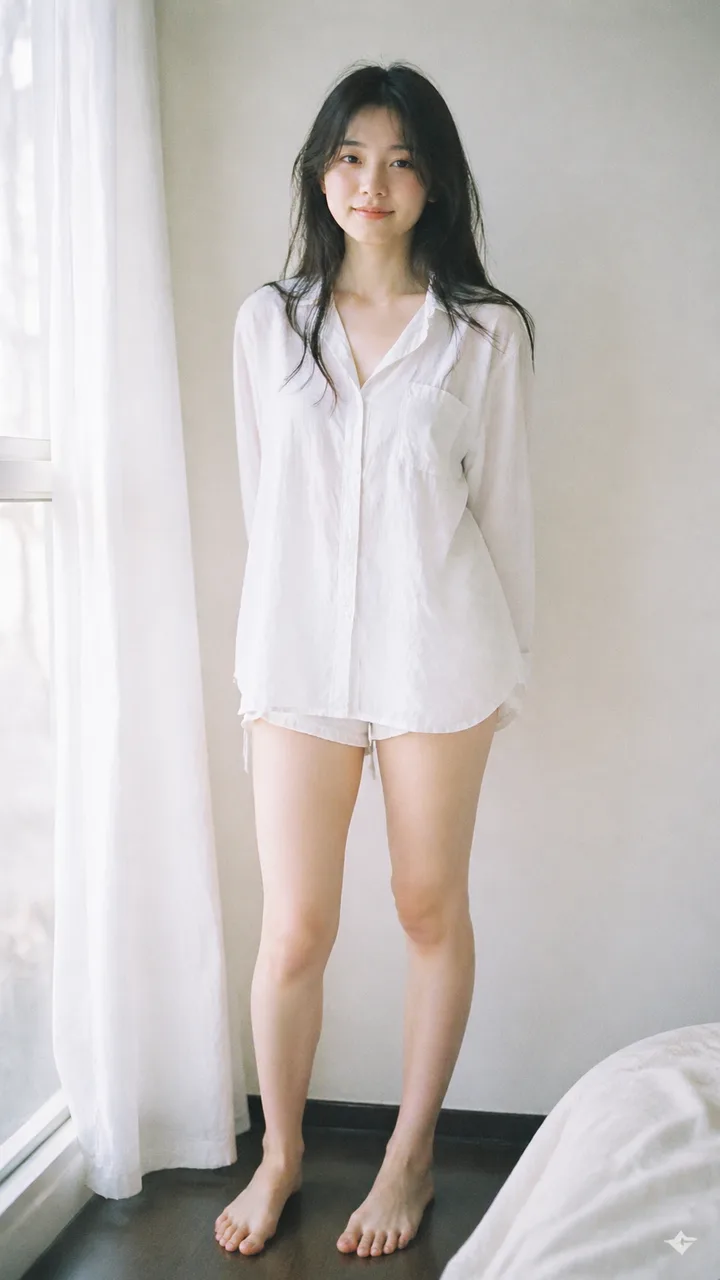
Analog 35mm film photography, soft airy Japanese-style aesthetic, gentle diffused natural window light, slight overexposure, pastel tones, low contrast, soft highlights, minimal indoor setting near a window with white curtains, clean light-colored wall, natural composition, eye-level, slightly closer full-body framing (mid-thigh to head), young East Asian woman, natural minimal makeup, soft realistic skin texture, long slightly messy dark hair, oversized white button-up shirt, light casual shorts, barefoot, simple and relaxed styling, standing naturally with relaxed posture, arms loosely at sides or slightly behind, facing camera, gentle soft smile, subtle stillness, focus on light, air, and quiet everyday mood, soft film grain, dreamy and understated atmosphere
Why it works: This prompt nails the "Japanese film photography" look by stacking three specific signals — analog 35mm, soft window light, and slight overexposure — before describing the subject at all. The lighting and film treatment establish the mood; the subject just inhabits it. Try the same skeleton with different subjects (a man in linen, a couple, a still life) for a consistent series. For more portrait-style scaffolds, see our portrait photography prompts collection.
Try this prompt on CubistAI →
2. Luxury Glam Beauty Portrait
Prompt:
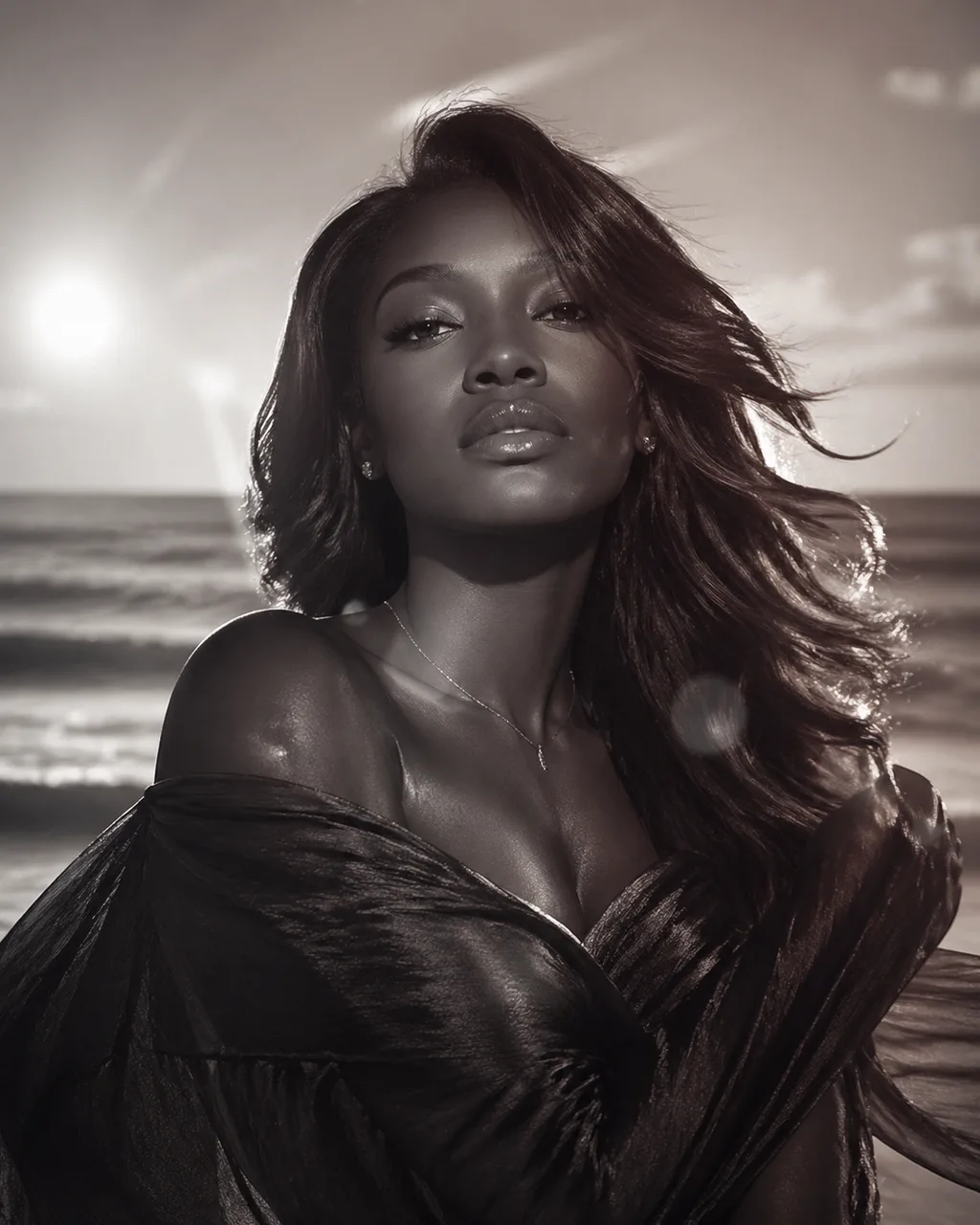
Luxury Glam Beauty Portrait: Beautiful Black woman, youthful spirit, creamy vanilla, silk press, mahogany red, subtle confidence, textured fabric, sapphire blue, minimal jewelry, beachside breeze, lens flare effect, nostalgic, cinematic lens, symmetrical composition, soft focus, high fashion photography, monochromatic, dewy finish, mysterious tension, layered elements
Why it works: This is the opposite of prompt #1 — instead of long flowing sentences, it's a "tag list" of fashion-magazine concepts, each separated by commas. GPT Image 2 handles both styles, but the tag-list approach is great when you know your aesthetic vocabulary and want to stack moods quickly. Notice how "monochromatic" and "lens flare effect" pull the whole look toward 1980s perfume-ad cinematography.
Try this prompt on CubistAI →
GPT Image 2 Prompts for Posters & Illustration
3. Boston Spring 2026 City Poster
Prompt:
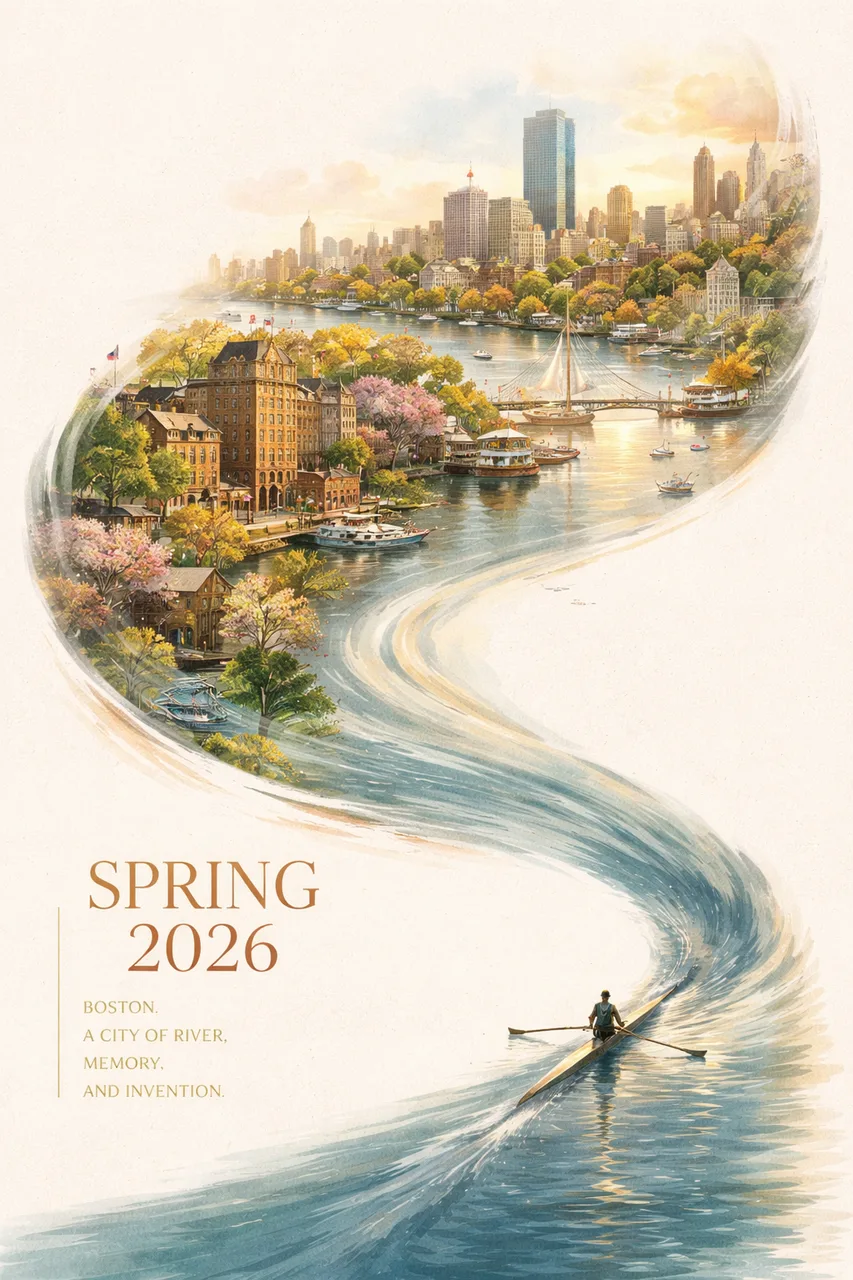
A striking Spring 2026 city poster for Boston with an elegant celebratory mood and a bold contemporary design. On a clean off-white textured background with large areas of negative space, a miniature single sculler rows across the lower right corner of the image on a narrow ribbon of reflective water. The wake from the oar sweeps upward in a dynamic calligraphic curve, gradually transforming into the Charles River and then into a dreamlike hand-painted panorama of Boston. Inside this flowing river-shaped composition are iconic Boston elements: the Back Bay skyline, Beacon Hill brownstones, Acorn Street, Boston Public Garden, Swan Boats, Zakim Bridge, Fenway-inspired details, historic brick architecture, harbor ferries, and the city's waterfront atmosphere. Soft morning fog, golden spring light, subtle festive accents in crimson and gold, rich detail, layered depth, sophisticated city-poster aesthetics, fresh and refined, visually powerful but not overcrowded. Elegant typography in the lower left reads "SPRING 2026" with a vertical slogan "BOSTON, A CITY OF RIVER, MEMORY, AND INVENTION", text clear and beautifully composed, premium graphic design, 9:16
Why it works: This is a masterclass in compositional prompting. The author doesn't just describe what's in the image — they describe the geometric flow ("the wake from the oar sweeps upward in a dynamic calligraphic curve, gradually transforming into the Charles River"). GPT Image 2 follows this curve faithfully and renders the typography ("SPRING 2026", "BOSTON, A CITY OF RIVER, MEMORY, AND INVENTION") cleanly inside the layout. Swap the city name and landmarks to make this work for any urban brand.
Try this prompt on CubistAI →
4. Vintage Amalfi Travel Poster
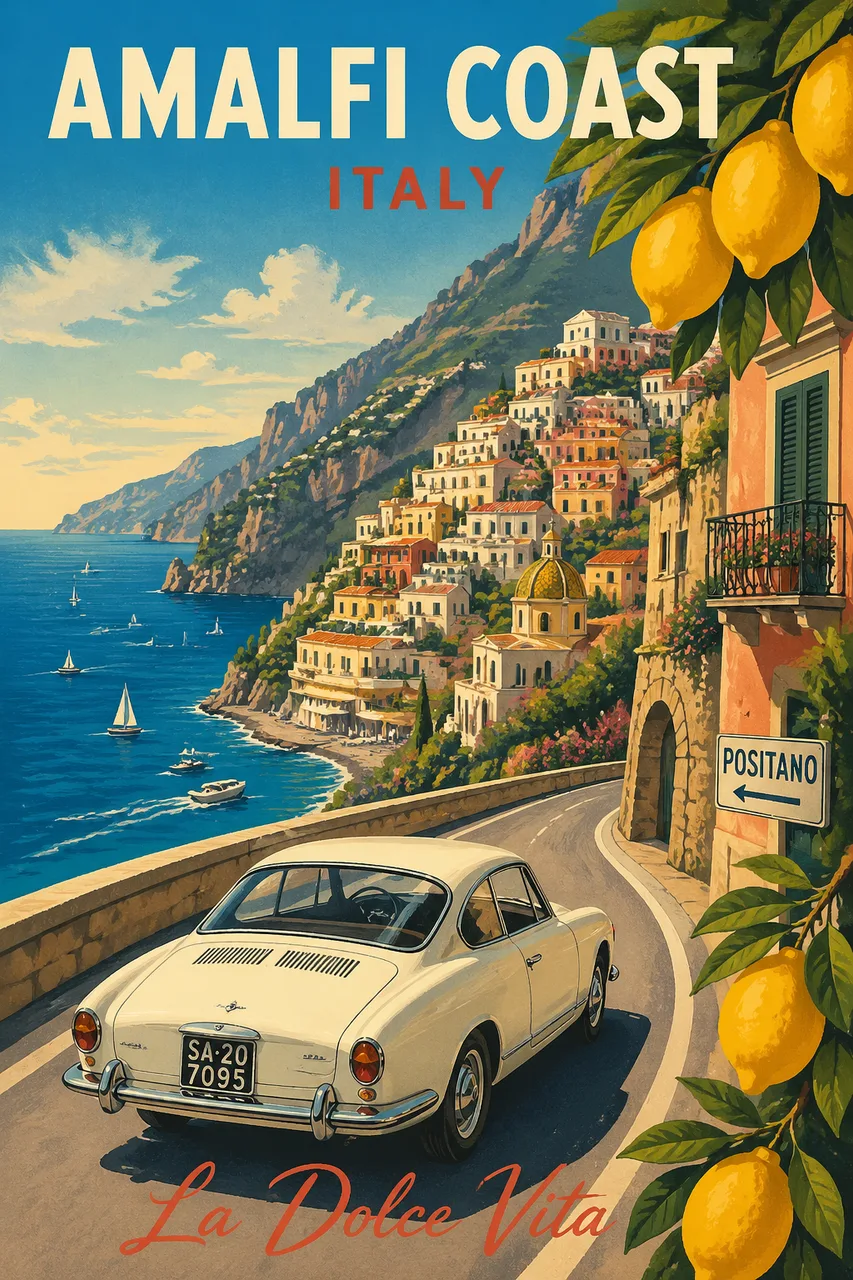
Prompt:
Modern pencil illustration of Vintage travel poster illustration of the Amalfi Coast, Italy, panoramic coastal cliff road scene, classic 1960s white car driving along a curved seaside road, deep blue Mediterranean sea with small sailboats, colorful pastel hillside village, bright blue sky with soft clouds, lemon tree branches with vibrant yellow lemons framing the foreground, warm summer sunlight, bold vibrant colors, retro 1950s travel poster style, cinematic composition, high detail, screen print texture, graphic illustration. Hand-drawn style, illustration with loose strokes and defined contours. High-contrast color palette, maintaining chromatic harmony between background and elements. Contemporary and decorative aesthetic.
Why it works: Naming a specific era ("1960s white car", "1950s travel poster style") is more powerful than vague terms like "vintage" or "retro". The "screen print texture" and "loose strokes and defined contours" instructions push the model away from photorealism into the right illustrated register. This template adapts beautifully to any destination — replace Amalfi with Kyoto, Marrakech, or Reykjavík.
Try this prompt on CubistAI →
GPT Image 2 Prompts for UI Mockups
5. Amateur iPhone Keynote Snapshot
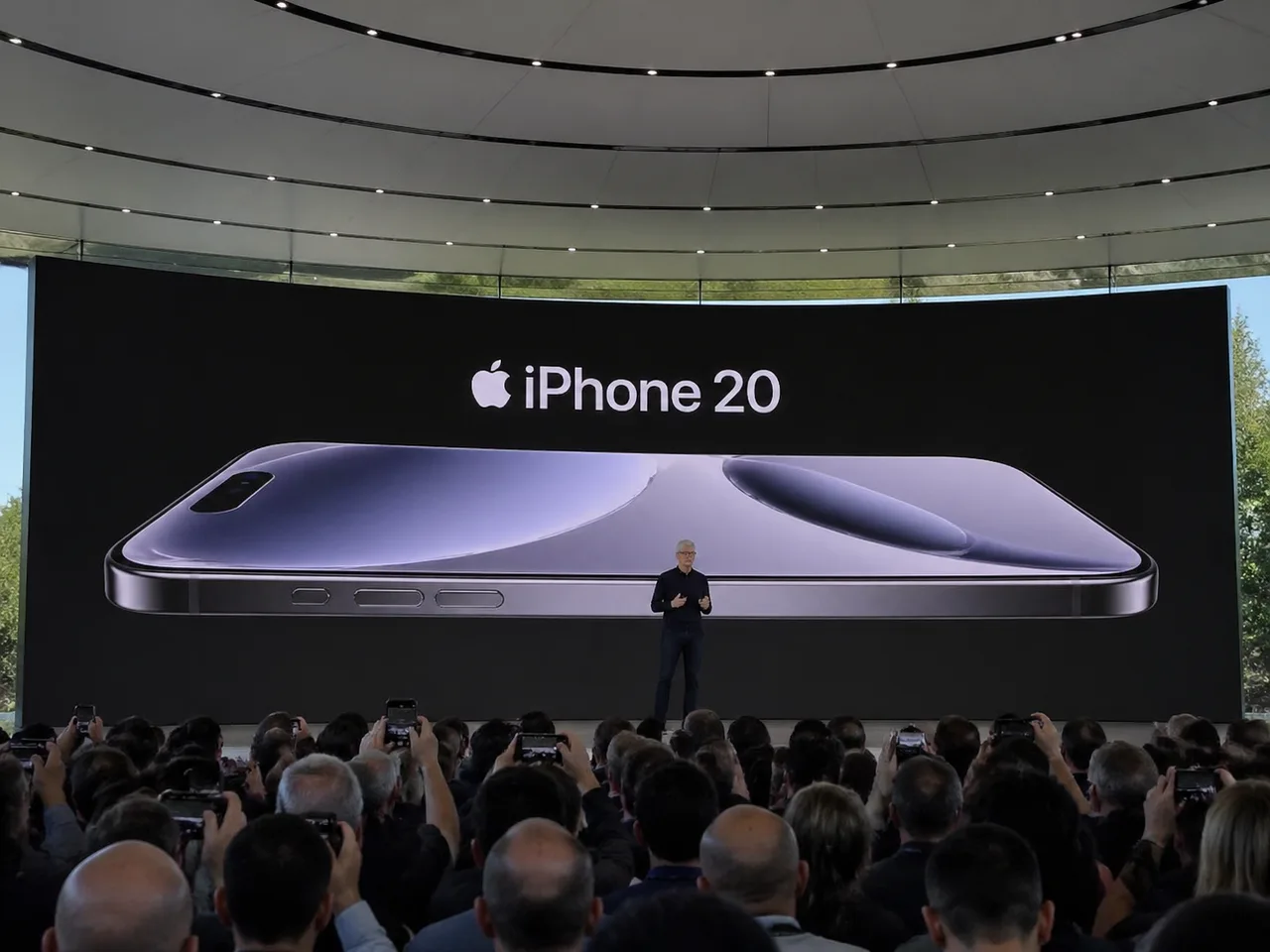
Prompt:
Amateur iPhone photo at Apple Park during the iPhone 20 keynote, Tim Cook presenting on stage. Shot from the crowd at a distance.
Why it works: Sometimes less is more. This 25-word prompt produces a photo so convincing it could pass as a real keynote leak. The trick is in three deliberate words: "amateur", "from the crowd", and "at a distance". Together they cue the slightly off framing, the hands holding phones in the foreground, and the reduced quality you'd expect from a real audience snapshot. Use this pattern any time you want a "found photo" rather than a polished render.
Try this prompt on CubistAI →
6. Song Dynasty Social Media Feed
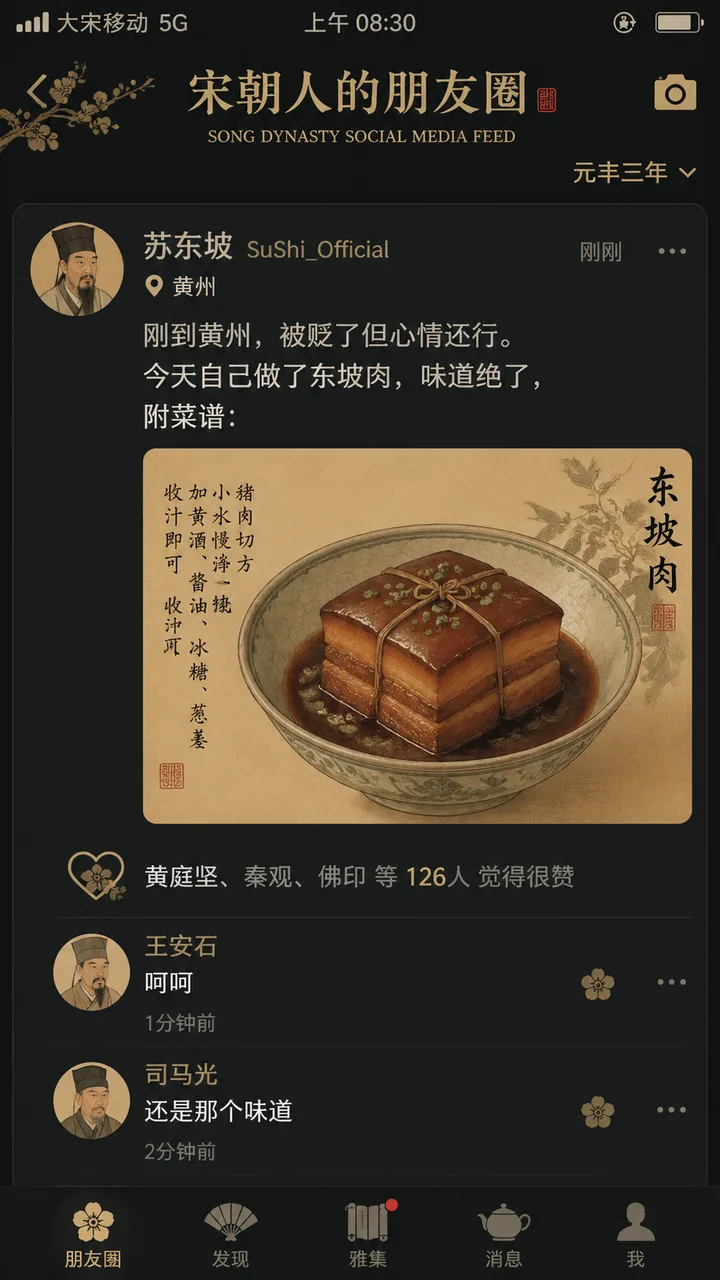
Prompt (English translation):
"宋朝人的朋友圈" / "SONG DYNASTY SOCIAL MEDIA FEED", a humorous fusion mockup of a modern smartphone social media interface filled with Song Dynasty content. Avatars are Song-era literati portraits in traditional ink painting style. Username "苏东坡 SuShi_Official" posts: "刚到黄州,被贬了但心情还行。今天自己做了东坡肉,味道绝了,附菜谱:" with an attached gongbi-style close-up of Dongpo pork. Like list shows "黄庭坚、秦观、佛印 等 126人". Comments: "王安石:呵呵" and "司马光:还是那个味道". UI elements like the like icon use Song Dynasty floral patterns. Status bar shows "大宋移动 5G" and "元丰三年". Dark mode color scheme paired with elegant Song Dynasty palette. Witty collision between Chinese history and modern social media UI.
Original prompt (Chinese):
"宋朝人的朋友圈"/"SONG DYNASTY SOCIAL MEDIA FEED",古今穿越幽默融合界面设计风格,画面模拟手机社交媒体界面,但内容全部是宋朝场景头像是宋代文人画像,用户名"苏东坡SuShi_Official",发布内容"刚到黄州,被贬了但心情还行。今天自己做了东坡肉,味道绝了,附菜谱:",配图为工笔画风格的东坡肉特写,点赞列表"黄庭坚、秦观、佛印等126人",评论区"王安石:呵呵""司马光:还是那个味道",界面元素如点赞图标用宋代花纹替代,状态栏显示"大宋移动 5G"和"元丰三年",配色为手机深色模式搭配宋代雅致色调,历史与社交媒体的趣味碰撞杰作
Why it works: This prompt does two things at once — it specifies a UI structure (avatar, post text, like list, comments, status bar) AND fills each slot with culturally specific content. GPT Image 2 renders all the Chinese characters faithfully, including the playful anachronisms ("大宋移动 5G", "元丰三年"). It's also a great demo of the model's multilingual capability: writing the prompt in Chinese tends to give better Chinese text rendering inside the image.
Try this prompt on CubistAI →
GPT Image 2 Prompts for Character Design
7. Mecha Girl Sea-City Key Visual
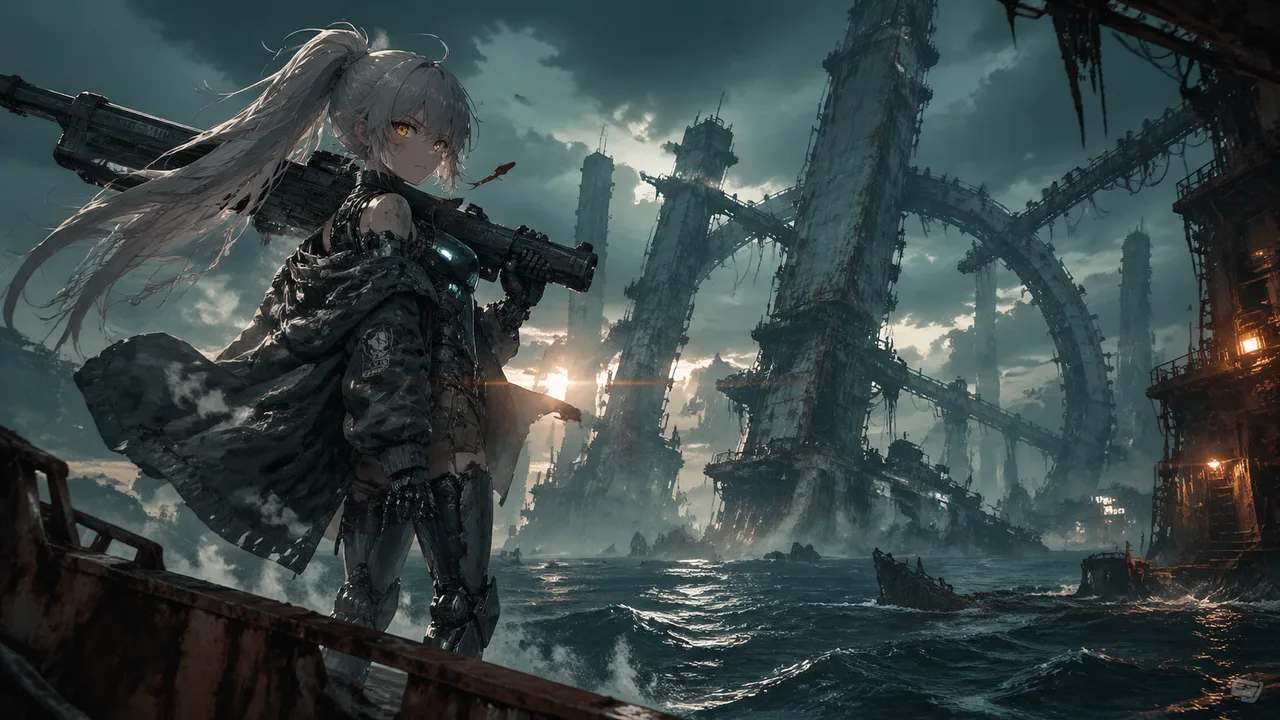
Prompt:
A mecha girl mid-teens, pale skin smudged with soot and salt spray, sharp amber eyes with glowing HUD reticles, waist-length ash-white hair tied in a high ponytail whipping in the sea wind, matte gunmetal exoskeleton armor plating her shoulders, forearms and shins, exposed hydraulic pistons at the joints, chest rig with glowing cyan coolant lines, oversized oil-stained hangar jacket half slipping off one shoulder, a massive rail cannon resting on her right shoulder, dog tags and frayed red ribbon at her collar, standing off-center to the left on the rusted edge of a tilted steel platform jutting out over dark water, weight shifted onto one leg, left hand gripping the cannon strap, head turned slightly toward camera with a quiet defiant stare, steam venting from her back thrusters, her ponytail and jacket streaming sideways in the salt wind, a vast derelict sea-city at dusk, colossal megastructures of unknown purpose rising from the ocean in staggered silhouettes, bone-white monolithic towers fused with barnacled steel, cyclopean ring-shaped constructs canted at broken angles, rusted skeletal gantries threaded with dead cables, dark swells rolling between the pylons, shipwrecks half-swallowed at their feet, thick sea fog clinging to the bases while the upper structures pierce into a bruised sky, scattered faint lights blinking high in the towers like distant eyes, moody low-key lighting, cold teal ambient from the overcast sky, warm amber sodium glow leaking from a distant structure camera-right, hard backlight from a low sun behind the towers carving her silhouette, volumetric god rays cutting through sea mist, wet specular highlights on her armor, 35mm anamorphic lens, slight low angle looking up past her shoulder toward the structures, medium-wide shot, shallow depth of field with foreground rust in soft focus, horizontal lens flares, fine atmospheric haze compressing the distant megastructures into layered silhouettes, cinematic anime key visual, painterly digital illustration with crisp line art, desaturated oceanic palette of teal, bone-white and rust punched by small warm accent lights, film grain, high-contrast editorial poster aesthetic.
Why it works: This is the gold standard of long-form prompt structure. Notice the order: character → pose → environment → lighting → camera → style. Each section is roughly 2-3 sentences with concrete physical details ("matte gunmetal exoskeleton", "exposed hydraulic pistons"), and the lighting paragraph alone has five distinct light sources that all show up in the result. If you want anime key-visual quality, copy this scaffold. For more anime-leaning prompts, our anime AI art tutorial breaks down the same structure across other styles.
Try this prompt on CubistAI →
8. Saint Seiya Gold Saints Card Grid
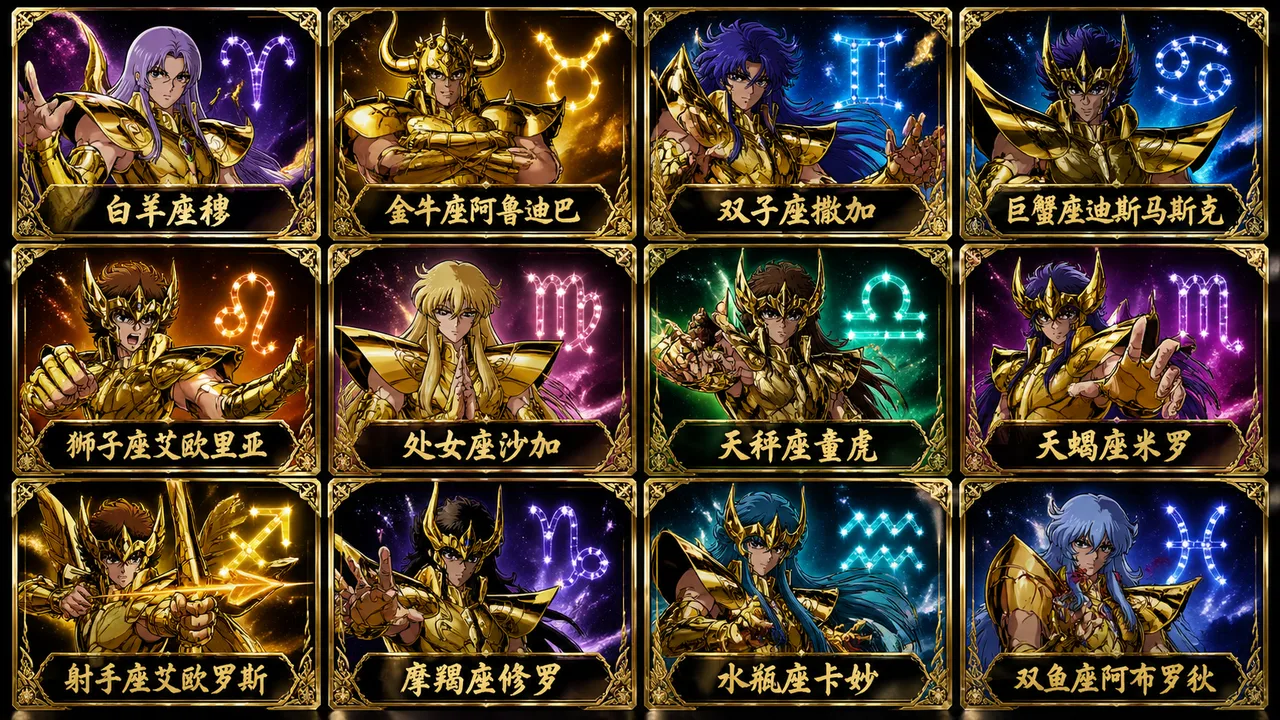
Prompt:
Generate a 12-card grid (3 rows × 4 columns) featuring the 12 Gold Saints of Saint Seiya, each in their signature golden zodiac armor with distinctive helmet design. Each card shows the saint in a heroic pose with their constellation symbol glowing in the background. Below each character, write the corresponding Chinese name in elegant calligraphy: 白羊座穆、金牛座阿鲁迪巴、双子座撒加、巨蟹座迪斯马斯克、狮子座艾欧里亚、处女座沙加、天秤座童虎、天蝎座米罗、射手座艾欧罗斯、摩羯座修罗、水瓶座卡妙、双鱼座阿布罗狄. Anime trading card aesthetic, dramatic lighting, vibrant gold and constellation-themed accent calls. Premium foil-card style finish.
Why it works: Grid layouts used to be painful in earlier image models — characters would blend, layouts would collapse. GPT Image 2 handles them cleanly when you specify the grid dimensions explicitly ("3 rows × 4 columns"), give each cell a distinct subject identity, and tell the model what label to put under each. This pattern is a powerful template for character sheets, product catalogs, mood boards, and tarot decks.
Try this prompt on CubistAI →
GPT Image 2 Prompts for Creative & Conceptual Art
9. Surreal Koi Nebula Illustration
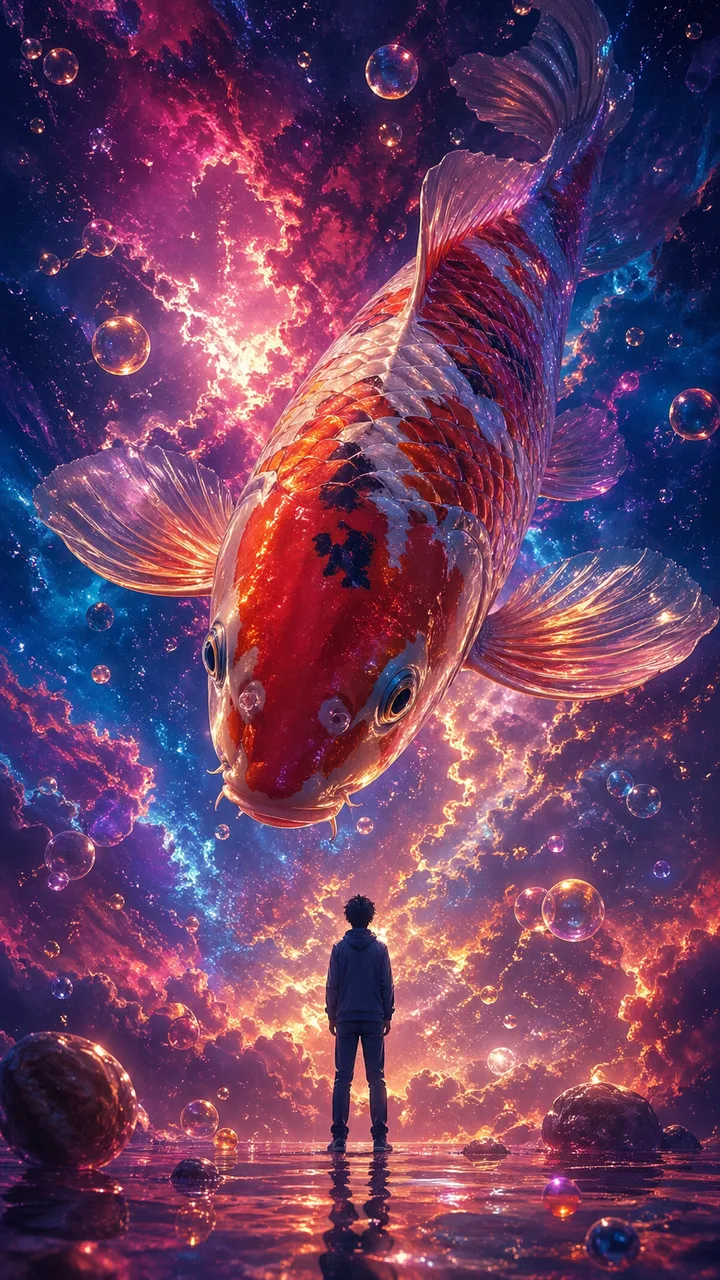
Prompt (English translation):
A surrealist digital illustration shot from an extreme low angle. A giant colorful koi fish swims through a dreamlike nebula, surrounded by vibrant cosmic clouds and floating bubbles. In the center of the frame stands a small human figure with their back to the viewer, gazing peacefully upward at the enormous koi above. The koi looks down at the tiny figure. The composition emphasizes a dramatic scale contrast between the massive fish and the small human, creating an ethereal, dreamlike atmosphere. Vibrant nebula colors of magenta, deep blue, and gold, with the koi's scales reflecting cosmic light.
Original prompt (Chinese):
一幅超现实主义数字插画风格,采用低角度仰拍视角。画面描绘了一条巨型彩色锦鲤遨游在梦幻般的星云中,四周环绕着色彩鲜艳的星云与气泡。画面中央还站着一个小人,背对观众,神情平静地仰望空中这条巨大的锦鲤,锦鲤头向下看着小人。整体画面呈现出强烈的大小对比,氛围空灵又梦幻。比例9:16
Why it works: Surrealist images live or die by scale contrast. This prompt makes that contrast the central instruction ("a giant colorful koi fish… a small human figure… dramatic scale contrast"), then sets up the gaze interaction ("the figure gazes upward… the koi looks down"). Scale + gaze is a reliable formula for emotional surrealist scenes. Replace the koi with any other oversized subject (a whale, a moth, a clockwork eye) and the structure still holds.
Try this prompt on CubistAI →
10. Handwritten Notebook Photo
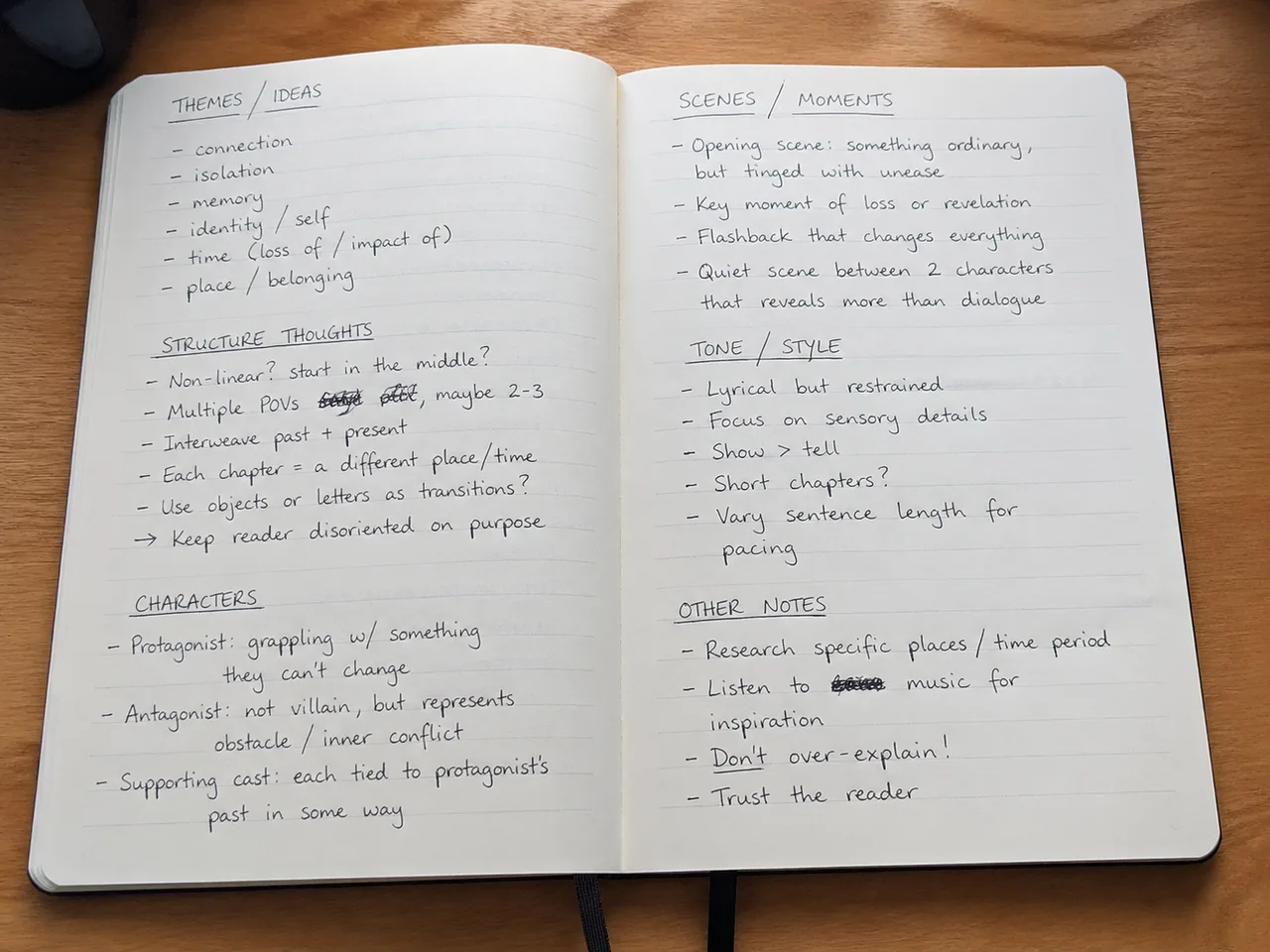
Prompt:
Amateur photo of an open notebook lying flat, filled with handwritten notes in black ballpoint pen. The handwriting is casual and slightly messy, like personal notes, natural imperfections, crossed out words, underlined headings. Shot from slightly above, natural daylight from a window, no flash. Casual desk setting, shot on iPhone.
Why it works: Handwriting was historically one of the hardest things for image models to fake convincingly. GPT Image 2 nails it when you give it permission to be imperfect — "casual and slightly messy", "natural imperfections", "crossed out words". Without those phrases, the model defaults to overly neat lettering that looks generated. Use this for fake screenshots of notes, journals, recipe cards, or whiteboards.
Try this prompt on CubistAI →
How to Adapt These GPT Image 2 Prompts to Your Own Ideas
The fastest way to build your own GPT Image 2 prompt library is to treat the prompts above as scaffolds and remix the parts that vary:
- Swap the subject, keep the lighting and camera. Prompt #1 works just as well with a man, a child, or a still life — the magic is in the analog 35mm + window light combo, not the specific person.
- Swap the proper nouns, keep the structure. Prompt #3 (Boston) becomes a Tokyo poster by replacing the river, the landmarks, and the slogan, keeping the calligraphic-curve composition intact.
- Swap the era, keep the medium. Prompt #4 (1960s travel poster) becomes a 1920s Art Deco poster or a 1990s Lonely Planet cover with one word change.
- Combine ingredients across prompts. Take the lighting paragraph from #7 (mecha girl) and apply it to the portrait scaffold from #1. Take the grid layout from #8 and use it for product photography. Most great prompts are recombinations.
- Use negatives sparingly. GPT Image 2 follows positive instructions better than negative ones. If you want to avoid an artifact, describe what you do want instead — see our negative prompts guide for when negatives still help.
- When in doubt, write longer. GPT Image 2 follows long prompts more reliably than most other models. If you're getting generic results, the answer is usually more specificity, not less.
If you want even more variations to experiment with, our AI prompt library has hundreds of ready-to-use prompts organized by category — many of them work well on GPT Image 2 with minimal adjustment.
Final Thoughts on GPT Image 2 Prompts
The 10 GPT Image 2 prompts above span almost every common use case — editorial portraits, city posters, vintage travel illustration, fake-leak UI mockups, anime key visuals, surrealist concept art, and even hand-drawn notes. What ties them together isn't a secret keyword; it's the same five-pattern scaffold from the top of this article: name the camera, name the lighting, name the framing, name the aesthetic, and layer in cultural specifics.
Treat this list as a starting deck of GPT Image 2 prompt examples rather than a fixed menu. Copy any prompt, change one or two anchor words, and you'll have a brand-new direction in seconds. For deeper coverage of the underlying technique, see our prompt engineering masterclass and the best prompt resources roundup.
Frequently Asked Questions About GPT Image 2 Prompts
What is GPT Image 2?
GPT Image 2 is OpenAI's latest text-to-image model. Compared to its predecessor (GPT Image 1 / DALL·E 3), it follows long, detailed prompts more reliably, renders text inside images with much higher accuracy, and works fluently across English, Chinese, Japanese, and other languages without losing visual coherence.
How long should a GPT Image 2 prompt be?
GPT Image 2 reliably handles prompts ranging from a single sentence (see Prompt #5) to dense paragraphs of 200+ words (see Prompt #7). Longer prompts are generally better when you need precise control over composition, lighting, and typography. If you're getting generic results, the fix is usually more specificity, not less.
Does GPT Image 2 work with Chinese, Japanese, or other non-English prompts?
Yes. GPT Image 2 is fully multilingual. In our experience, writing the prompt in the same language as the text you want rendered inside the image (e.g. Chinese prompts for Chinese characters in the output) tends to produce cleaner typography. See Prompts #6 and #9 for working Chinese examples.
Can I use images generated by GPT Image 2 commercially?
Usage rights depend on the platform you generate on. On CubistAI, images you generate with the GPT Image 2 endpoint are yours to use for personal and commercial projects, in line with the underlying model's usage policy. Always double-check the provider's terms before publishing client work.
How does GPT Image 2 compare to Nano Banana 2 and Seedream 4?
GPT Image 2 is the strongest at following long compositional instructions and rendering legible text inside images. Nano Banana 2 leans more photographic and consistent for portraits. Seedream 4 is faster and cheaper for iterating ideas quickly. CubistAI lets you switch between all three on the same prompt to compare results side by side.
Why does my GPT Image 2 image still look generic even with a long prompt?
Two fixes usually solve it: (1) name a specific aesthetic such as "cinematic anime key visual" or "1960s travel poster style", and (2) describe the lighting explicitly, e.g. "harsh on-camera flash" or "golden spring backlight". Without these anchors, GPT Image 2 averages toward a default look. See the five patterns at the top of this article.
How do I write GPT Image 2 prompts that include text or typography?
State the exact text in quotes, specify its location in the layout (e.g. "typography in the lower left reads..."), and describe the type style ("elegant serif", "premium graphic design"). GPT Image 2 will follow both the wording and the visual treatment. Prompt #3 (the Boston poster) is a clean example of this pattern.
Try GPT Image 2 on CubistAI
Every image in this post was generated using CubistAI's GPT Image 2 endpoint with no post-processing. You can run all 10 prompts above on your own account, tweak them, and share your results in seconds.
Open GPT Image 2 →