2026年4月26日
35 分钟阅读
CubistAI 团队
GPT Image 2AI 提示词提示词工程教程文生图
GPT Image 2 提示词精选 10 例(附真实出图)
精选 10 个 GPT Image 2 高质量提示词,涵盖人像、海报、UI 拟稿、角色设计与创意概念图,每个都附完整提示词、实际生成结果和写作要点。
发布于 2026年4月26日
精选 10 个 GPT Image 2 高质量提示词,涵盖人像、海报、UI 拟稿、角色设计与创意概念图,每个都附完整提示词、实际生成结果和写作要点。
GPT Image 2 已经迅速成为目前最强的文生图模型之一。相比上一代,它能更稳定地遵循长篇、复杂的提示词,画面里的文字渲染准确度高得惊人,并且在中文、英文、日文等多语言之间切换时仍能保持视觉一致性。
但和所有图像模型一样,最难的部分始终是「到底该写什么」。为了帮你省去反复试错的过程,我们从社区里挑选了 10 个最具代表性的 GPT Image 2 提示词,并通过 CubistAI 的 GPT Image 2 端点全部重新生成了一遍。每条都附上完整提示词、实际出图、为什么有效的简短解读,以及一键复用的链接。
在进入案例之前,先抽出几个几乎在所有优秀 GPT Image 2 提示词里都能看到的共性模式。如果只能记住五件事,就记这五条:
指定相机和胶片型号。「35mm film photography」「anamorphic lens」「shot on iPhone」这类表述能在一秒内锁定整体视觉气质。GPT Image 2 对具体相机和胶片的「质感」有相当强的直觉,点名它们就能省下大量描述工作。
明确写出光线。「机顶硬直闪」「窗边柔和漫射光」「春日金色光」「冷青调环境光的低光位氛围」——光线词对情绪的塑造远超主体词本身。省略它们,画面立刻变得平淡。
指定画幅和取景。GPT Image 2 同时尊重提示词里的画幅指令(「9:16 竖版」「16:9」「Format 16:9.」)和 API 的 size 参数。复杂场景下还要描述取景:「亲密中景」「极低机位仰拍」「越过她肩膀的微仰角」。
用一种基础美学锚定风格。不要只描述主体——直接说出视觉门类:「电影感动漫主视觉」「1960 年代旅游海报风格」「时尚大刊编辑摄影」「超现实数字插画」。这一句往往比十个形容词更有效。
加入文化与情境细节。GPT Image 2 对文化梗的理解深度令人惊讶——「宋代文人」「圣斗士黄金圣斗士」「Beacon Hill 红砖联排」「阿马尔菲的柠檬」。能用具体专有名词的地方就别用泛泛的说法。
这五条原则同样是我们在提示词工程大师课和提示词工程实用技巧里反复强调的骨架,只是这次针对 GPT Image 2 更强的长文本与图内文字渲染能力做了适配。带着这五条进入下面的案例。
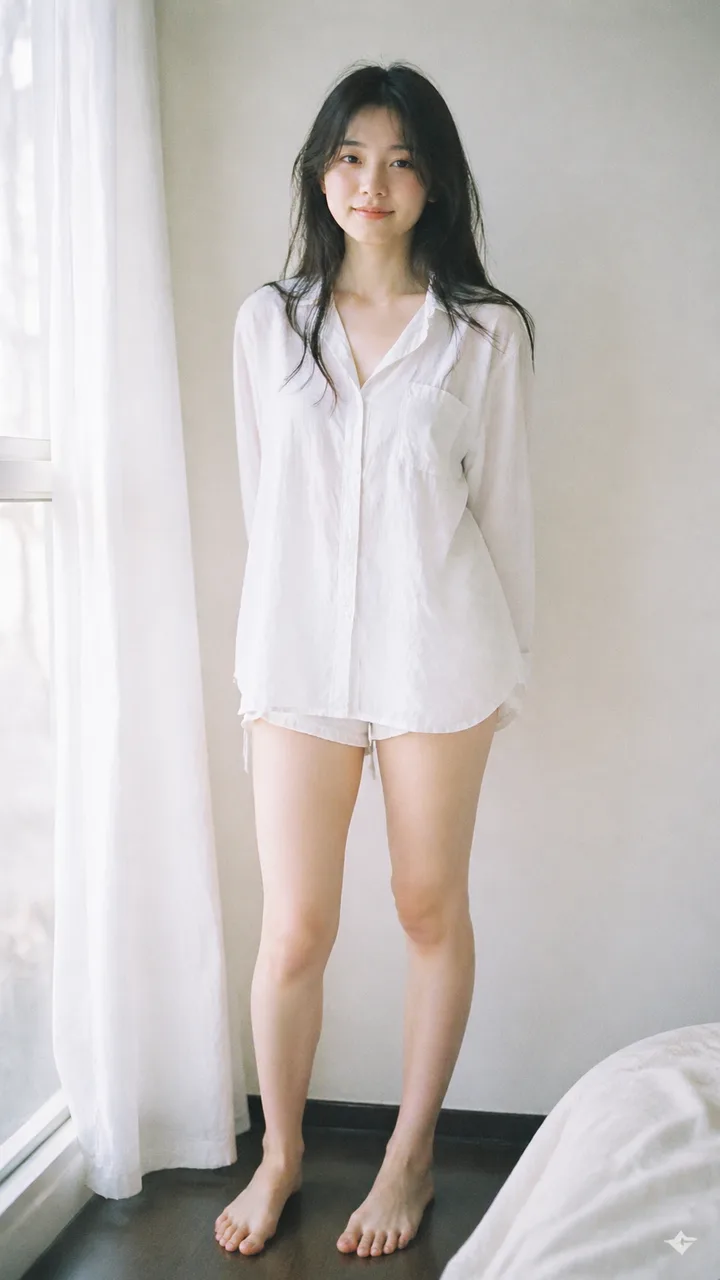
提示词:
Analog 35mm film photography, soft airy Japanese-style aesthetic, gentle diffused natural window light, slight overexposure, pastel tones, low contrast, soft highlights, minimal indoor setting near a window with white curtains, clean light-colored wall, natural composition, eye-level, slightly closer full-body framing (mid-thigh to head), young East Asian woman, natural minimal makeup, soft realistic skin texture, long slightly messy dark hair, oversized white button-up shirt, light casual shorts, barefoot, simple and relaxed styling, standing naturally with relaxed posture, arms loosely at sides or slightly behind, facing camera, gentle soft smile, subtle stillness, focus on light, air, and quiet everyday mood, soft film grain, dreamy and understated atmosphere
为什么有效: 这条提示词在描述人物之前,先用三个具体信号叠出了「日系胶片」气质——35mm 胶片、窗光柔光、轻度过曝。光线与胶片设定先把氛围立起来,主体只是融入其中。把这套骨架换成不同主体(穿亚麻的男生、情侣、静物)就能拍出风格统一的系列作。更多人像骨架可以参考我们的人像摄影提示词集合。
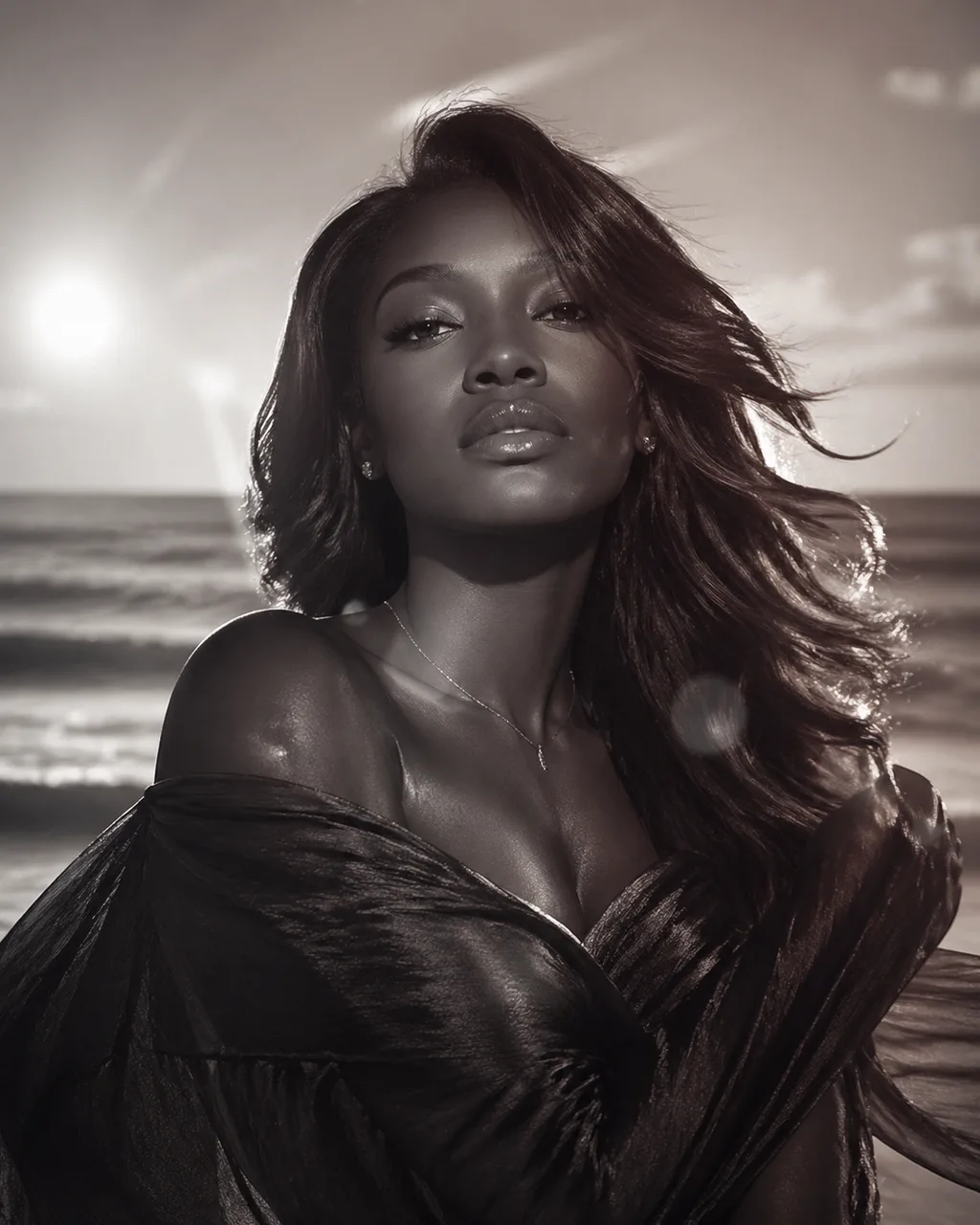
提示词:
Luxury Glam Beauty Portrait: Beautiful Black woman, youthful spirit, creamy vanilla, silk press, mahogany red, subtle confidence, textured fabric, sapphire blue, minimal jewelry, beachside breeze, lens flare effect, nostalgic, cinematic lens, symmetrical composition, soft focus, high fashion photography, monochromatic, dewy finish, mysterious tension, layered elements
为什么有效: 它和提示词 1 完全相反——不是流畅的长句,而是一串以逗号分隔的「时尚刊物概念标签」。GPT Image 2 两种写法都能消化,标签流的优势在于:当你已经掌握了一套审美词汇,可以快速堆叠情绪。注意「monochromatic」和「lens flare effect」是把整张图拽向 1980 年代香水广告调子的关键。
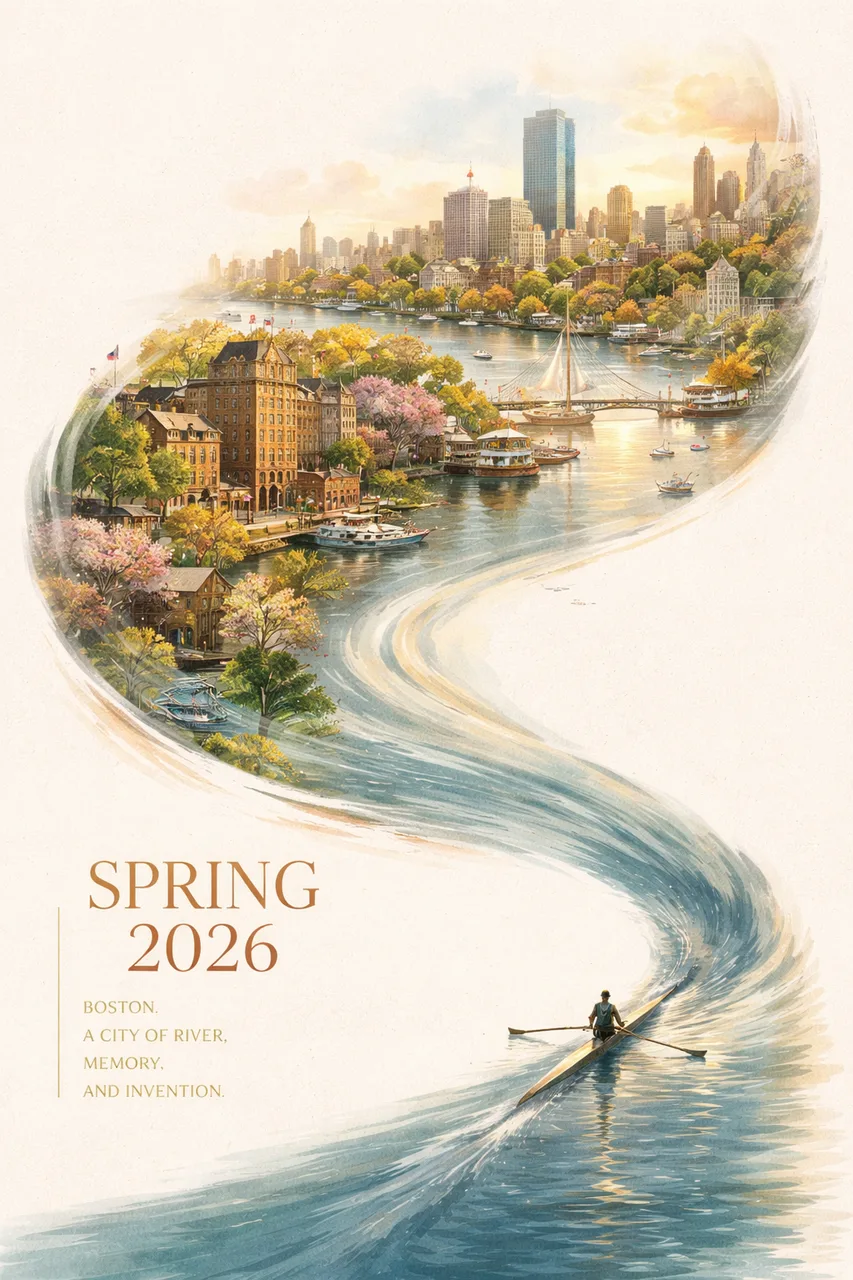
提示词:
A striking Spring 2026 city poster for Boston with an elegant celebratory mood and a bold contemporary design. On a clean off-white textured background with large areas of negative space, a miniature single sculler rows across the lower right corner of the image on a narrow ribbon of reflective water. The wake from the oar sweeps upward in a dynamic calligraphic curve, gradually transforming into the Charles River and then into a dreamlike hand-painted panorama of Boston. Inside this flowing river-shaped composition are iconic Boston elements: the Back Bay skyline, Beacon Hill brownstones, Acorn Street, Boston Public Garden, Swan Boats, Zakim Bridge, Fenway-inspired details, historic brick architecture, harbor ferries, and the city's waterfront atmosphere. Soft morning fog, golden spring light, subtle festive accents in crimson and gold, rich detail, layered depth, sophisticated city-poster aesthetics, fresh and refined, visually powerful but not overcrowded. Elegant typography in the lower left reads "SPRING 2026" with a vertical slogan "BOSTON, A CITY OF RIVER, MEMORY, AND INVENTION", text clear and beautifully composed, premium graphic design, 9:16
为什么有效: 这是一堂构图提示词的范例课。作者不只是描述画面里有什么,而是描述了几何流向:「桨痕从右下方腾起,化为流畅的书法弧线,逐渐变成查尔斯河」。GPT Image 2 忠实地把这条弧线画了出来,并把版面里的 "SPRING 2026" 与 "BOSTON, A CITY OF RIVER, MEMORY, AND INVENTION" 干净地排了进去。把城市名和地标换掉,这套骨架就能套用到任何城市品牌上。
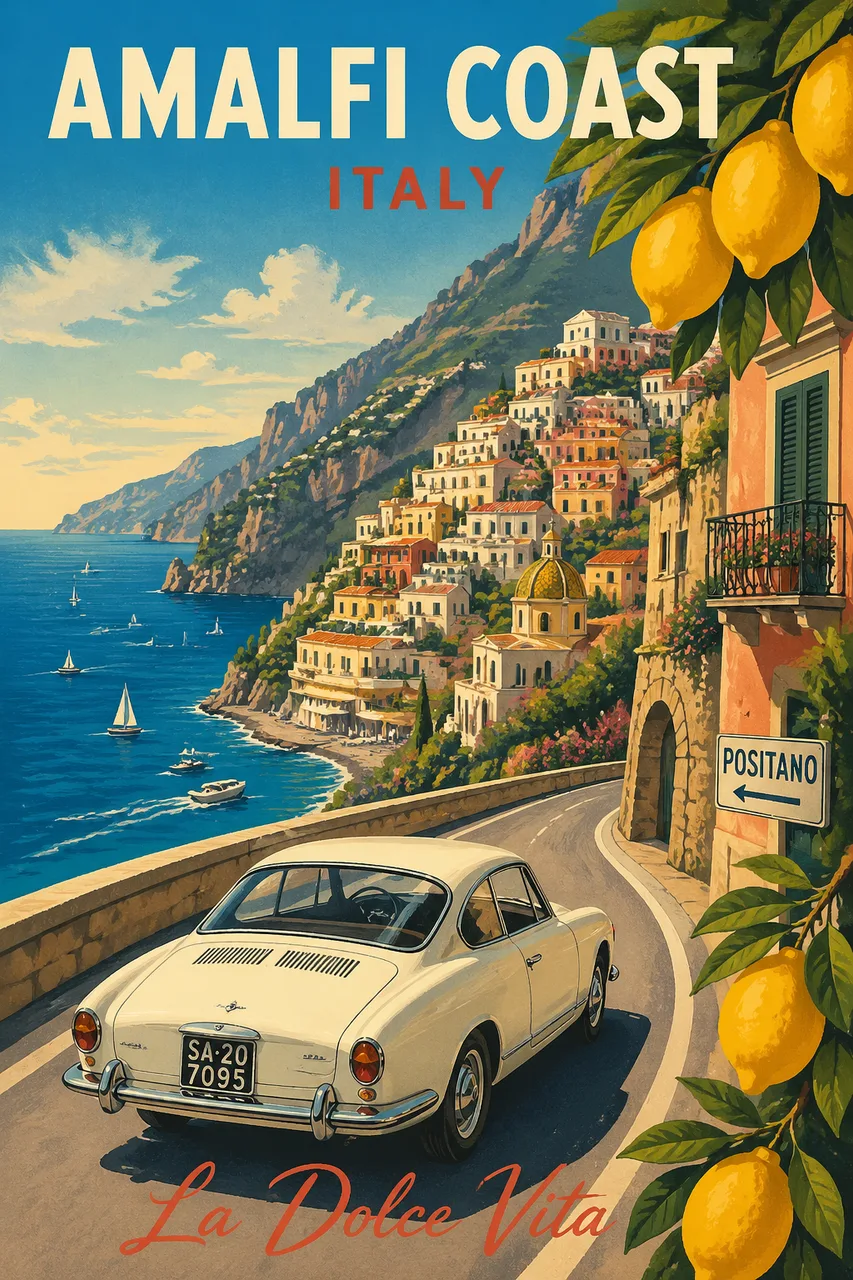
提示词:
Modern pencil illustration of Vintage travel poster illustration of the Amalfi Coast, Italy, panoramic coastal cliff road scene, classic 1960s white car driving along a curved seaside road, deep blue Mediterranean sea with small sailboats, colorful pastel hillside village, bright blue sky with soft clouds, lemon tree branches with vibrant yellow lemons framing the foreground, warm summer sunlight, bold vibrant colors, retro 1950s travel poster style, cinematic composition, high detail, screen print texture, graphic illustration. Hand-drawn style, illustration with loose strokes and defined contours. High-contrast color palette, maintaining chromatic harmony between background and elements. Contemporary and decorative aesthetic.
为什么有效: 点名一个具体年代(「1960 年代白色轿车」「1950 年代旅游海报风格」)远比模糊地说「复古」「怀旧」更有效。「screen print texture」和「loose strokes and defined contours」把模型从写实路径推向插画语言。把阿马尔菲换成京都、马拉喀什、雷克雅未克,这套模板都能完美适配。
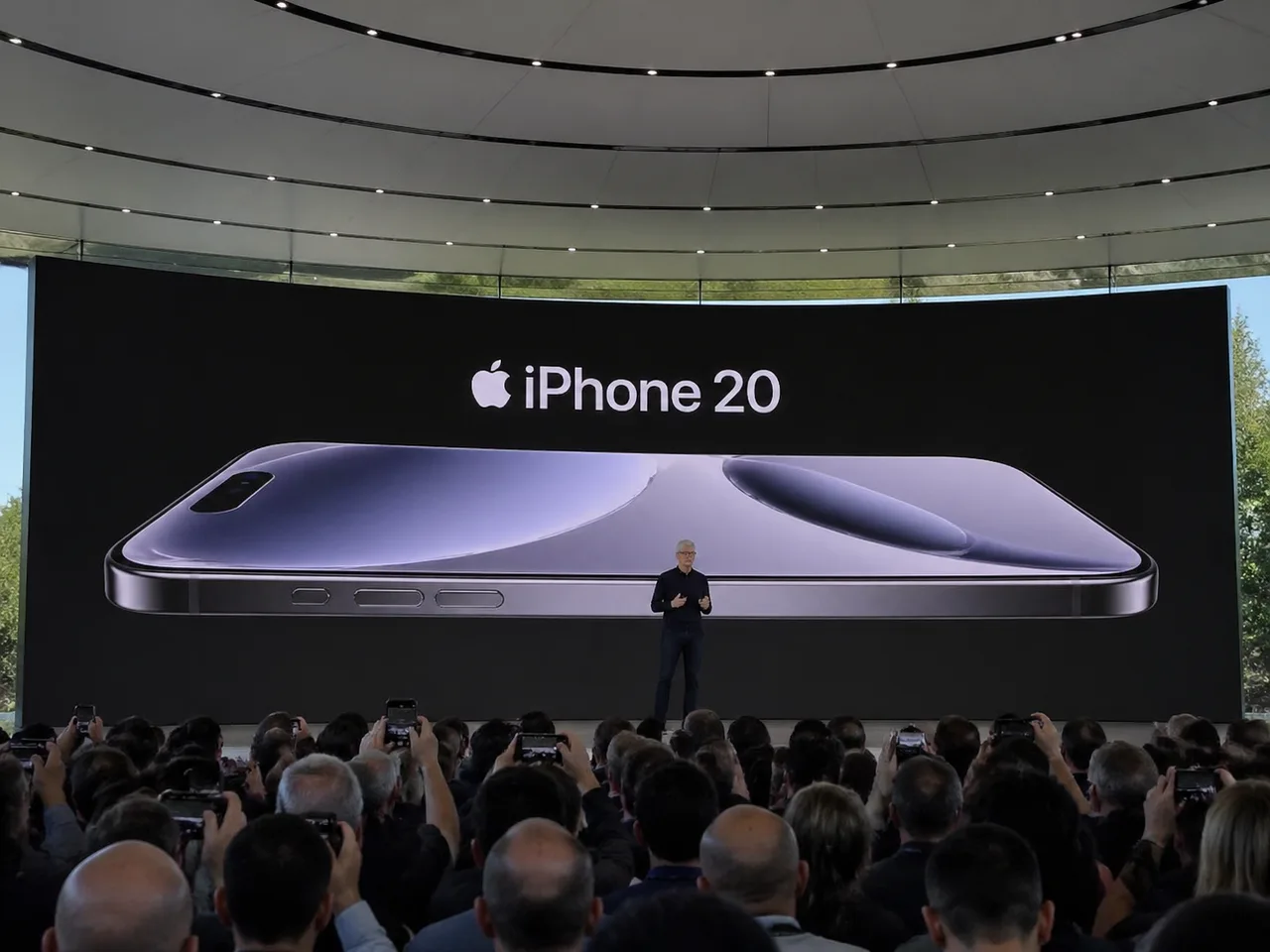
提示词:
Amateur iPhone photo at Apple Park during the iPhone 20 keynote, Tim Cook presenting on stage. Shot from the crowd at a distance.
为什么有效: 有时候少即是多。这条不到 25 个英文单词的提示词,却能生成几乎可以冒充真实泄露照的图。关键在于三个有意为之的词:「amateur」「from the crowd」「at a distance」——它们暗示了略歪的取景、前景中举起的手机、以及观众席真实拍摄会有的画质衰减。任何想要「捡到的现场照」而非精修渲染的场景都可以套用这个模式。
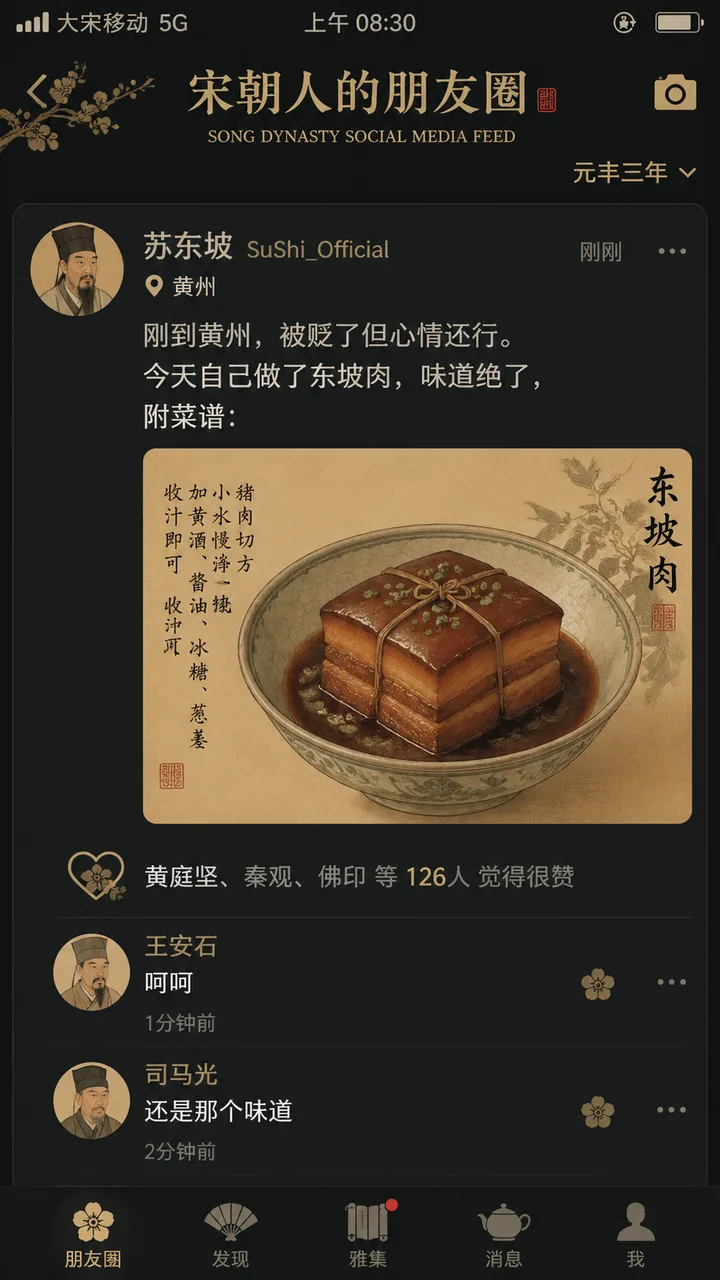
提示词(中文原版):
"宋朝人的朋友圈"/"SONG DYNASTY SOCIAL MEDIA FEED",古今穿越幽默融合界面设计风格,画面模拟手机社交媒体界面,但内容全部是宋朝场景头像是宋代文人画像,用户名"苏东坡SuShi_Official",发布内容"刚到黄州,被贬了但心情还行。今天自己做了东坡肉,味道绝了,附菜谱:",配图为工笔画风格的东坡肉特写,点赞列表"黄庭坚、秦观、佛印等126人",评论区"王安石:呵呵""司马光:还是那个味道",界面元素如点赞图标用宋代花纹替代,状态栏显示"大宋移动 5G"和"元丰三年",配色为手机深色模式搭配宋代雅致色调,历史与社交媒体的趣味碰撞杰作
为什么有效: 这条提示词同时做了两件事——它先指定了一套 UI 结构(头像、动态正文、点赞列表、评论区、状态栏),又把每一个槽位填上了文化上极具特征的内容。GPT Image 2 把所有汉字都忠实地渲染了出来,包括「大宋移动 5G」「元丰三年」这种刻意制造的反差萌。这同时也是模型多语言能力的最佳示范:当你想让画面里出现中文,直接用中文写整段提示词,字形通常会更干净。
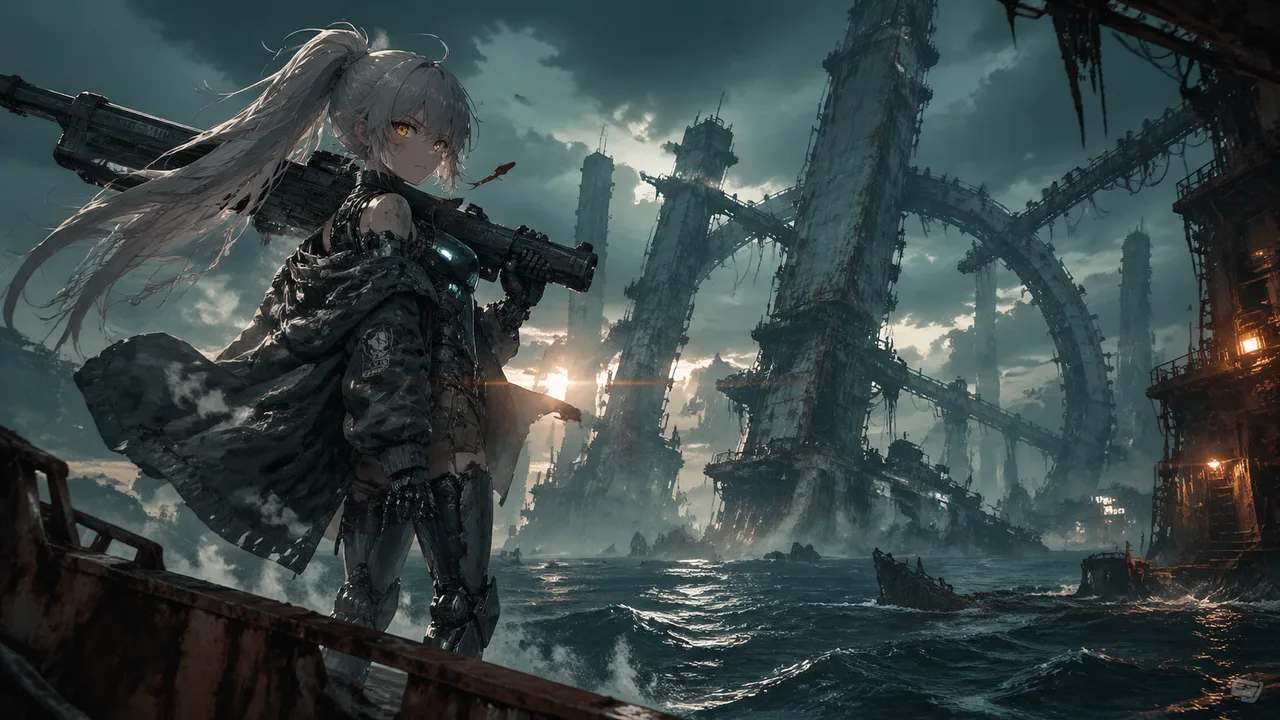
提示词:
A mecha girl mid-teens, pale skin smudged with soot and salt spray, sharp amber eyes with glowing HUD reticles, waist-length ash-white hair tied in a high ponytail whipping in the sea wind, matte gunmetal exoskeleton armor plating her shoulders, forearms and shins, exposed hydraulic pistons at the joints, chest rig with glowing cyan coolant lines, oversized oil-stained hangar jacket half slipping off one shoulder, a massive rail cannon resting on her right shoulder, dog tags and frayed red ribbon at her collar, standing off-center to the left on the rusted edge of a tilted steel platform jutting out over dark water, weight shifted onto one leg, left hand gripping the cannon strap, head turned slightly toward camera with a quiet defiant stare, steam venting from her back thrusters, her ponytail and jacket streaming sideways in the salt wind, a vast derelict sea-city at dusk, colossal megastructures of unknown purpose rising from the ocean in staggered silhouettes, bone-white monolithic towers fused with barnacled steel, cyclopean ring-shaped constructs canted at broken angles, rusted skeletal gantries threaded with dead cables, dark swells rolling between the pylons, shipwrecks half-swallowed at their feet, thick sea fog clinging to the bases while the upper structures pierce into a bruised sky, scattered faint lights blinking high in the towers like distant eyes, moody low-key lighting, cold teal ambient from the overcast sky, warm amber sodium glow leaking from a distant structure camera-right, hard backlight from a low sun behind the towers carving her silhouette, volumetric god rays cutting through sea mist, wet specular highlights on her armor, 35mm anamorphic lens, slight low angle looking up past her shoulder toward the structures, medium-wide shot, shallow depth of field with foreground rust in soft focus, horizontal lens flares, fine atmospheric haze compressing the distant megastructures into layered silhouettes, cinematic anime key visual, painterly digital illustration with crisp line art, desaturated oceanic palette of teal, bone-white and rust punched by small warm accent lights, film grain, high-contrast editorial poster aesthetic.
为什么有效: 这是长篇提示词结构的金标准。注意它的顺序:角色 → 姿态 → 环境 → 光线 → 镜头 → 风格。每一段大约两到三句具体物理细节(「哑光枪灰外骨骼装甲」「关节处外露的液压活塞」),单是光线段落就有五个不同的光源,每一个都在结果里出现了。要做动漫主视觉级别的图,照搬这套骨架。更多动漫风骨架可参考我们的动漫 AI 艺术教程。
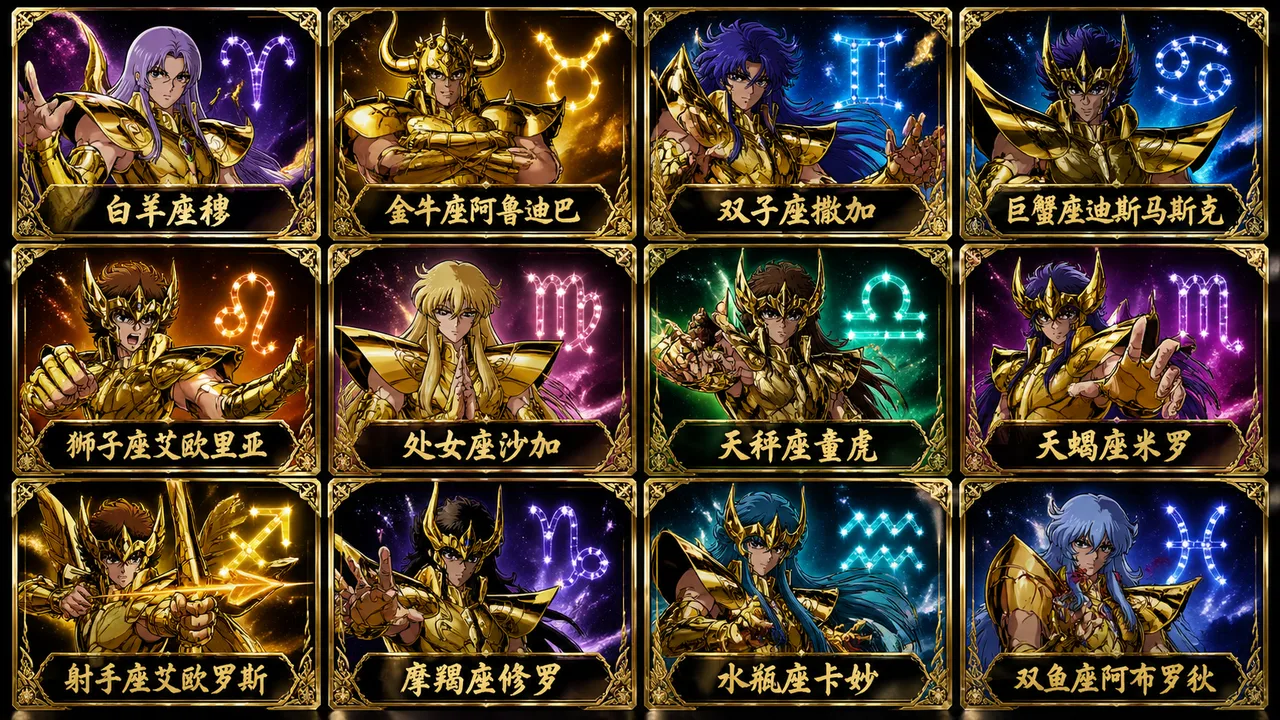
提示词:
Generate a 12-card grid (3 rows × 4 columns) featuring the 12 Gold Saints of Saint Seiya, each in their signature golden zodiac armor with distinctive helmet design. Each card shows the saint in a heroic pose with their constellation symbol glowing in the background. Below each character, write the corresponding Chinese name in elegant calligraphy: 白羊座穆、金牛座阿鲁迪巴、双子座撒加、巨蟹座迪斯马斯克、狮子座艾欧里亚、处女座沙加、天秤座童虎、天蝎座米罗、射手座艾欧罗斯、摩羯座修罗、水瓶座卡妙、双鱼座阿布罗狄. Anime trading card aesthetic, dramatic lighting, vibrant gold and constellation-themed accent calls. Premium foil-card style finish.
为什么有效: 网格布局曾经是早期图像模型的痛点——人物会糊到一起,版面会塌掉。GPT Image 2 在三个条件齐备时就能稳稳画出来:明确写出网格尺寸(「3 rows × 4 columns」)、给每格一个清晰的主体身份、告诉模型要在每格下面写什么标签。这套模式可以直接复用到角色档案、产品目录、情绪板、塔罗牌等场景。
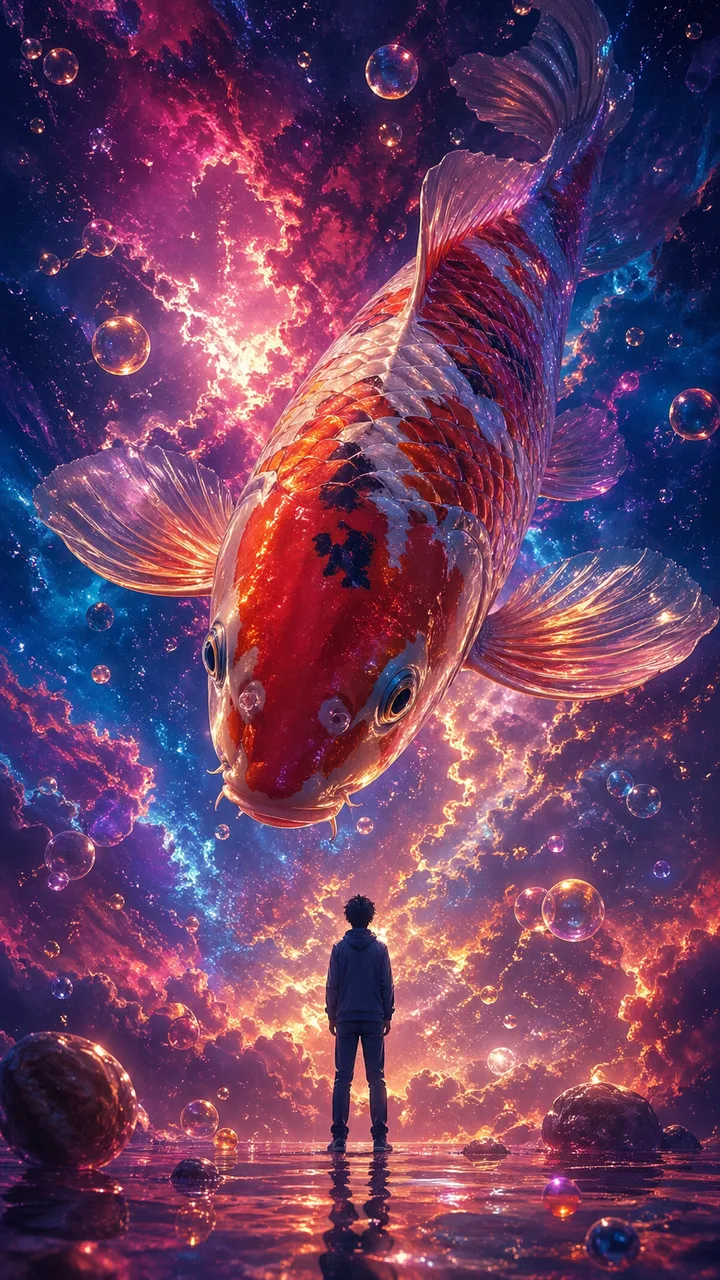
提示词(中文原版):
一幅超现实主义数字插画风格,采用低角度仰拍视角。画面描绘了一条巨型彩色锦鲤遨游在梦幻般的星云中,四周环绕着色彩鲜艳的星云与气泡。画面中央还站着一个小人,背对观众,神情平静地仰望空中这条巨大的锦鲤,锦鲤头向下看着小人。整体画面呈现出强烈的大小对比,氛围空灵又梦幻。比例9:16
为什么有效: 超现实图的成败几乎全在「尺度对比」上。这条提示词把这种对比变成了核心指令(「一条巨型彩色锦鲤……一个背对观众的小人……强烈的大小对比」),并且设计了视线的互动(「小人仰望……锦鲤俯视」)。「尺度 + 视线」是超现实情绪场景的可靠公式。把锦鲤换成任何超大主体(鲸鱼、飞蛾、机械之眼),结构依然成立。
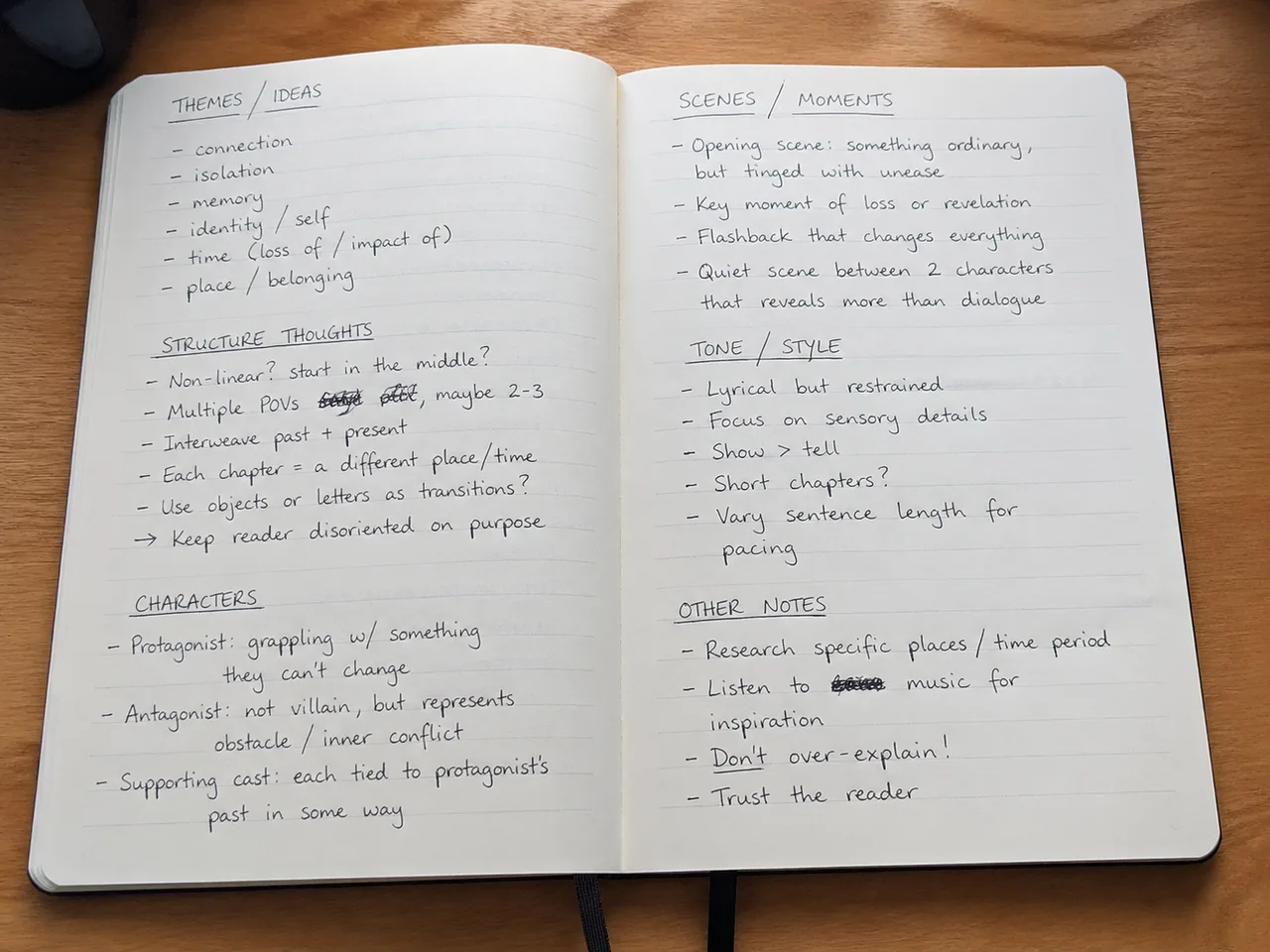
提示词:
Amateur photo of an open notebook lying flat, filled with handwritten notes in black ballpoint pen. The handwriting is casual and slightly messy, like personal notes, natural imperfections, crossed out words, underlined headings. Shot from slightly above, natural daylight from a window, no flash. Casual desk setting, shot on iPhone.
为什么有效: 手写字曾是图像模型最难伪造的元素之一。GPT Image 2 在你「允许它不完美」的时候反而画得最好——「随意微乱」「自然瑕疵」「划掉的词」。少了这些表述,模型会默认写出过分工整、一眼假的字。无论是假的笔记截图、日记、菜谱卡,还是白板照,都可以用这个模式。
把上面这些提示词当成「骨架」,对会变的部分做替换,是最快建立自己 GPT Image 2 提示词库的方法:
如果你想要更多可直接套用的提示词模板,我们的 AI 提示词库按类别整理了上百条,绝大多数稍作调整就能在 GPT Image 2 上跑出好结果。
上面这 10 个 GPT Image 2 提示词覆盖了几乎所有常见用途——杂志感人像、城市海报、复古旅行插画、伪泄露 UI、动漫主视觉、超现实概念艺术,甚至手写笔记本。串起它们的不是某个秘密关键词,而是文章开头那五条骨架:写明相机、写明光线、写明取景、写明审美、再叠上文化细节。
把这份清单当成提示词起点,而不是固定菜单。复制任意一条,换一两个锚点词,几秒钟你就有了一个全新的方向。想再深入了解底层方法论,可以看提示词工程大师课和最佳提示词资源汇总。
GPT Image 2 是 OpenAI 最新一代文生图模型。相较于上一代(GPT Image 1 / DALL·E 3),它对长且复杂的提示词理解得更稳,能在画面中渲染出可读性极高的文字,并且对中文、英文、日文等多语言都支持得很好,不会因为语言切换而丢失视觉一致性。
从一句话(见提示词 5)到 200 字以上的段落(见提示词 7),GPT Image 2 都能稳定处理。当你需要精确控制构图、光线、字体排版时,长提示词通常效果更好。如果出图过于平庸,多半是细节不够,而不是太长。
完全支持。我们的实测经验是:如果你想让画面里出现中文字符,最好用中文写整段提示词,这样字形会更干净。文中提示词 6 和 9 就是中文提示词的实战示例。
授权范围取决于你使用的平台。在 CubistAI 上通过 GPT Image 2 端点生成的图片,可在符合底层模型使用政策的前提下用于个人和商业项目。如果是给客户交付,建议在发布前再次确认平台条款。
GPT Image 2 在执行长篇构图指令、渲染图内文字方面是最强的;Nano Banana 2 偏向写实风,人像更稳;Seedream 4 在快速试错和迭代场景下更便宜更快。CubistAI 支持用同一段提示词在三者之间切换对比。
通常两件事可以解决:(1) 指明一种具体审美,比如「电影感动漫主视觉」或「1960 年代旅游海报风格」;(2) 把光线说清楚,比如「机顶硬闪」或「春日金色逆光」。少了这些锚点,模型就会回归默认风。回到文章开头的五条原则。
用引号写出准确文本,指明它在画面中的位置(例如「左下方排版写着……」),并描述字体风格(「优雅衬线」「精致平面设计」)。GPT Image 2 会同时遵循文字内容和视觉处理。提示词 3(波士顿海报)就是一个干净的范例。
本文里的每一张图都是通过 CubistAI 的 GPT Image 2 端点直接生成的,没有任何后期处理。你可以在自己的账号下完整跑通这 10 条提示词,调整出属于自己的版本,再分享出去。